




How to Play Poker Apps on PC and Mac (2026)
Poker apps are built for phones, but serious volume is easier on a big screen with a mouse. Some apps ship real desktop clients, others only run through an Android emulator — and that difference matters for comfort, multi-tabling and even account security. Here’s what works on Windows and Mac, app by app.
Updated: 16 October 2026- ClubGG and PPPoker have native Windows and macOS clients; Suprema has a Windows client.
- PokerBros, Pokerrrr 2 and X-Poker are mobile only — on a computer players use an Android emulator.
- ClubGG allows 4 tables at once (12 on PC with WSOP+ Premium); PPPoker allows 3.
- One account works on phone and computer — clubs and balance are shared.
- If an official client exists, use it: emulators are slower and can raise questions with security checks.
Which poker apps have a PC client
| App | Windows | macOS | Tables at once | How to play on a computer |
|---|---|---|---|---|
| ClubGG | Native client (Windows 10+) | Native client (macOS 11+) | 4 (12 on PC with WSOP+ Premium) | Official client from the ClubGG website |
| PPPoker | Official client (.msi) | Official client (.dmg) | 3 | Official client from the PPPoker website |
| Suprema | Windows client | Not documented | 4 | Windows client |
| PokerBros | No official client | No official client | 4 | Android emulator |
| Pokerrrr 2 | No — mobile only | No — mobile only | 4 | Android emulator |
| X-Poker | No official client | No official client | 4 | Android emulator |
A native client is a real Windows or Mac program: proper windows, keyboard and mouse, stable performance. An emulator runs the Android version inside a virtual phone — it works, but it’s a workaround. There’s no web version of ClubGG and no Linux client.
ClubGG 4.5 · 1PPPokerReviews & guideSuprema PokerReviews & guidePokerBrosReviews & guidePokerrrr 2Reviews & guide X-PokerReviews & guide
ClubGG on Windows
ClubGG’s Windows client is free and downloads from the official ClubGG website (Chrome or Microsoft Edge recommended). It’s the same account as on your phone: clubs, balance and PokerCraft stats sync automatically.
- 1Open the official ClubGG website and download the Windows installer (.msi, about 370 MB).
- 2Run the installer and follow the wizard.
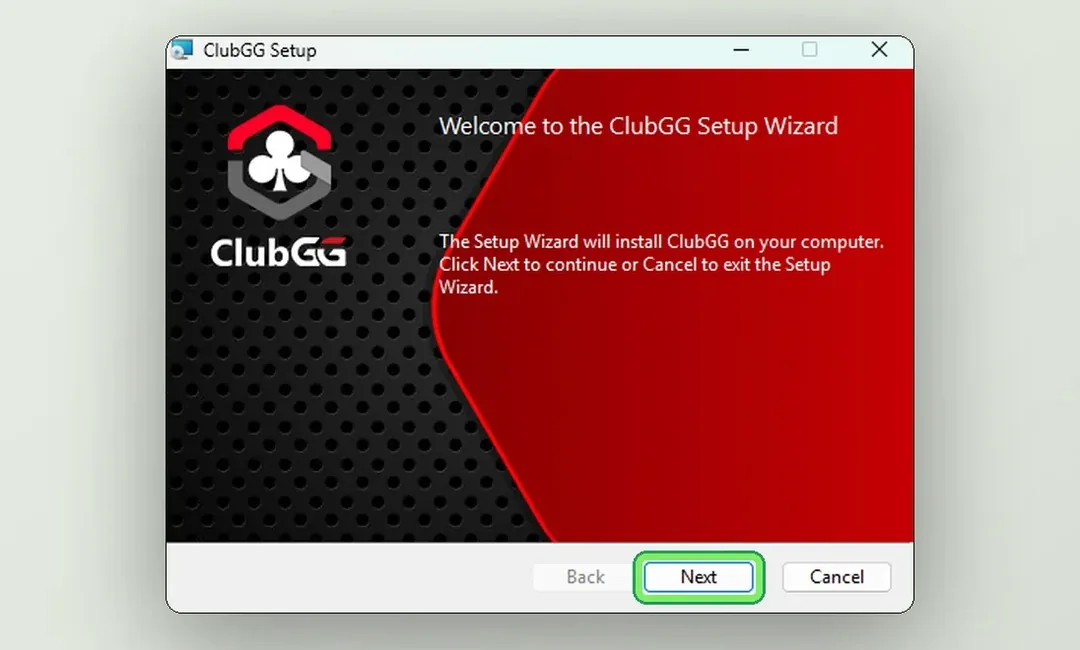
- 3Launch ClubGG and log in with your account — or register a new one.
- 4Your clubs and balance appear automatically. Open up to 4 tables and arrange them on screen.
| Minimum | Recommended | |
|---|---|---|
| Windows | Windows 10, 4 GB RAM | Windows 11, 8 GB RAM, SSD |
| Disk space | About 1 GB | 2 GB to leave room for updates |
Full guide with screenshots: ClubGG on PC and how to download ClubGG.
ClubGG on Mac
ClubGG also has a native macOS client. It is not on the Mac App Store — download it only from the official ClubGG website as a .dmg image.
- 1Download the macOS installer from the official ClubGG website.
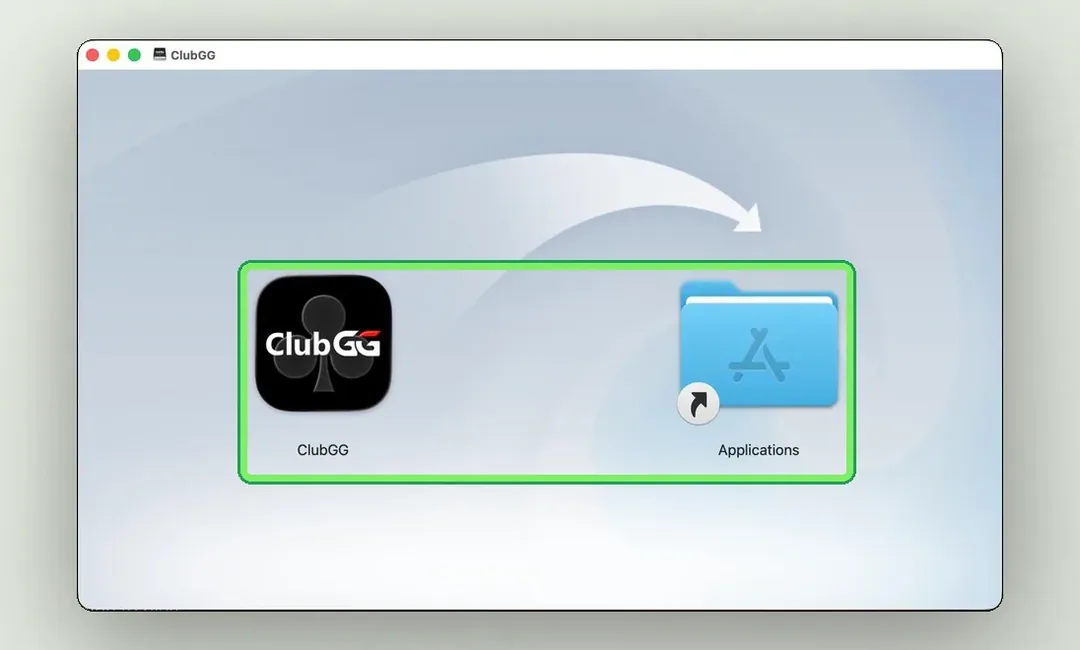
- 2Open the .dmg and drag ClubGG into the Applications folder.
- 3Launch ClubGG from Applications, not from the mounted image — otherwise macOS warns you on every launch.
- 4Log in with your account; clubs, balance and stats sync with your phone.
| Minimum | Recommended | |
|---|---|---|
| macOS | macOS 11+, 2017+ Mac (Intel), 4 GB RAM | 2020+ Mac (Apple Silicon), 8 GB RAM, SSD |
PPPoker and Suprema: official desktop clients
PPPoker on Windows and Mac
PPPoker has official clients for Windows (.msi) and macOS (.dmg) — not emulators. Both download from the official PPPoker website, and your account, balance and clubs are shared with the phone app.
- 1Open the official PPPoker website on your computer and download the Windows (.msi) or Mac (.dmg) client.
- 2Install and log in — balance, clubs and settings sync with mobile.
- 3Arrange up to 3 tables side by side.
Suprema Poker on Windows
Suprema has clients for iOS, Android and Windows. Download the Windows version only from Suprema’s official source, and check with your agent which tables and formats the club runs — Suprema is above all a PLO app.
PokerBros, Pokerrrr 2 and X-Poker: emulators
These three apps have no official desktop client. To play them on a computer, players install an Android emulator such as BlueStacks and run the Android app inside it.
- 1Install an Android emulator from its developer’s official website.
- 2Inside the emulator, install the poker app from Google Play — or, where the app is distributed as an APK (as with X-Poker), only from the official source.
- 3Log in with your existing account and check your clubs and balance.
- 4Before playing for money, ask your agent whether the club allows emulators.
- Emulator caveats
- Slower and heavier than a native app — expect lag on weaker computers.
- Clubs with GPS/IP protection may treat emulator logins with suspicion; some restrict them.
- Never install “modded” builds or emulator bundles from random sites — they can steal your login.
- Third-party HUDs and helpers running next to the emulator are still banned in most clubs.
Multi-tabling
Each app has its own limit on how many tables you can play at once. On a computer each table opens in its own window, so you can tile them on one monitor or spread them across two.
| App | Tables at once | Note |
|---|---|---|
| ClubGG | 4 | 12 on PC with the WSOP+ Premium membership |
| PPPoker | 3 | Same limit on phone and computer |
| PokerBros | 4 | On a phone, or through an emulator |
More tables means less attention per hand. If you’re moving from one phone table, add one table at a time and watch your results in PokerCraft before adding more.
PC vs phone: what you gain
- Several tables at once, in big windows.
- PokerCraft graphs and hand replays are far easier to read on a big screen.
- A more stable connection over cable or home Wi-Fi.
- Hotkeys and precise bet sizing with the mouse.
Troubleshooting desktop clients
| Problem | What to do |
|---|---|
| The installer won’t download | Download again from the official website, check you have about 1 GB free, try another browser. |
| Stuck on “Checking for updates” | Check your internet, switch off any proxy or VPN while updating, restart the client; reinstall if it persists. |
| Mac warns on every launch | Move the app to Applications and launch it from there, not from the .dmg. |
| “Undergoing maintenance” | Scheduled or urgent maintenance — wait it out, usually up to a couple of hours. |
| Lag and disconnects | Use a stable connection and close heavy programs; desktop clients are usually more stable than mobile. |
More fixes: poker app not working — common problems.
FAQ
01Can I play ClubGG on PC?
Yes. ClubGG has native clients for Windows 10+ and macOS 11+, free from the official ClubGG website. You can play up to 4 tables, or 12 on PC with WSOP+ Premium.
02Is there PPPoker for Mac?
Yes — PPPoker has an official macOS client (.dmg) as well as a Windows client (.msi), so no emulator is needed.
03How do I play PokerBros on a computer?
PokerBros has no official desktop client, so players use an Android emulator. Ask your club whether emulators are allowed before playing for money.
04Is it safe to use an emulator for poker apps?
Install the emulator and the app only from official sources. Some clubs restrict emulator play, and third-party helpers are banned regardless.
05Can I use the same account on phone and PC?
Yes — clubs and balance are shared. In PPPoker, logging in on PC closes your phone session.
06Does ClubGG have a web or Linux version?
No. ClubGG offers apps for Windows, macOS, iPhone/iPad and Android only.
Read next
All-in or Fold (AoF) Poker: Rules and Push/Fold Strategy (2026)Read Are Poker Apps Rigged? ClubGG, PPPoker, PokerBros and OthersRead Best Poker Apps for Low Stakes and Beginners (2026)Read Best Club Poker Apps in 2026: Ranked by Player ReviewsRead Bomb Pot Poker: Rules, Strategy and Where to Play (2026)Read ClubGG vs PPPoker vs PokerBros: Which Club Poker App to Choose (2026)Read