How to Create Your Own Club on PPPoker
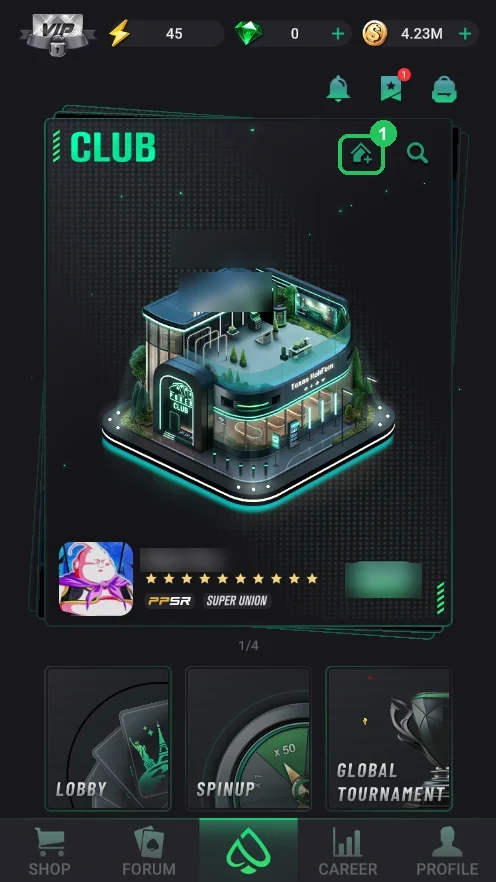
Any player can create a club on PPPoker — for free, with the house-with-plus icon on the home screen. The hard part is everything after: accepting players, setting up tables and rake, issuing chips through the Counter and, if you want, joining other clubs in a union.
We've split the whole process into separate pages: every club feature gets its own step with screenshots and an explanation next to each screen. Follow them in order or open what you need from the menu on the left: “Creating a table”, “Members”, “Counter”, “Admin” and “Union” are folders with detailed pages.
The key difference from ClubGG is that the club Counter isn’t free: club chips (PP) are bought with diamonds, and the app takes 5% on every chip send-out. Button names are given as in the English PPPoker interface; newer versions may move things around slightly, but the logic stays the same.
How to remove the 5% fee and most costs. PPPoker offers an “all-inclusive” contract: the club pays a deposit and gets unlimited chips, an unlimited club level (Club Rating) and automatic table opening; instead of buying chips and paying 5% per send-out, it pays PPPoker a share of the club’s rake every week. Want your club on these terms? Contact us and we’ll help set it up.
- Creating a club
- Free
- Counter fee
- 5% per send-out
- PP chip top-ups
- from 10 members
- Union
- Free and instant
- Union table
- diamonds/hour, from 4
- Club Rating
- from 1,500 diamonds / 60 seats
All steps — tap any step to open it
You need a PPPoker account first — see the guides on installing and registration.
- Step 1Create the club: the house-with-plus iconThe house-with-plus icon on the home-screen Club card creates a club for free, and it gets an ID straight away. Own clubs: 1, or up to 3 with VIP Black or Platinum.Open step
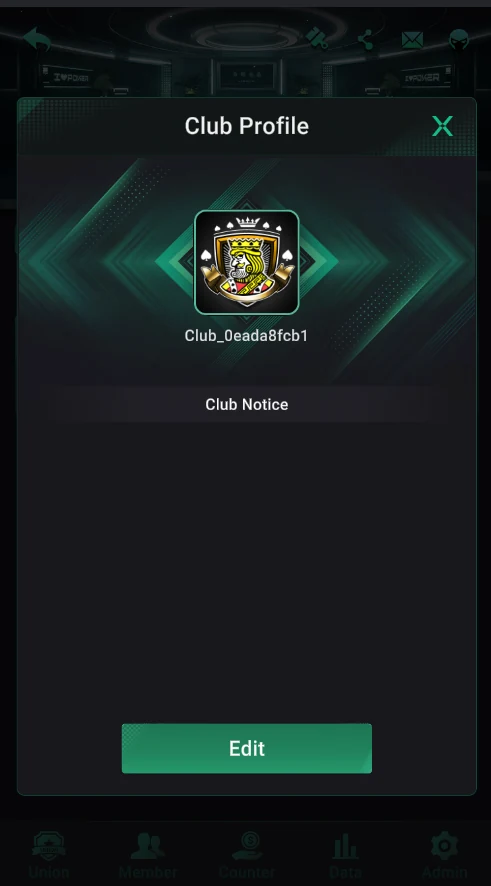
- Step 2Club name, logo and notice (Club Profile)Tap the club name in the lobby → Edit: logo, name and Club Notice — a message for members. The first rename is free.Open step
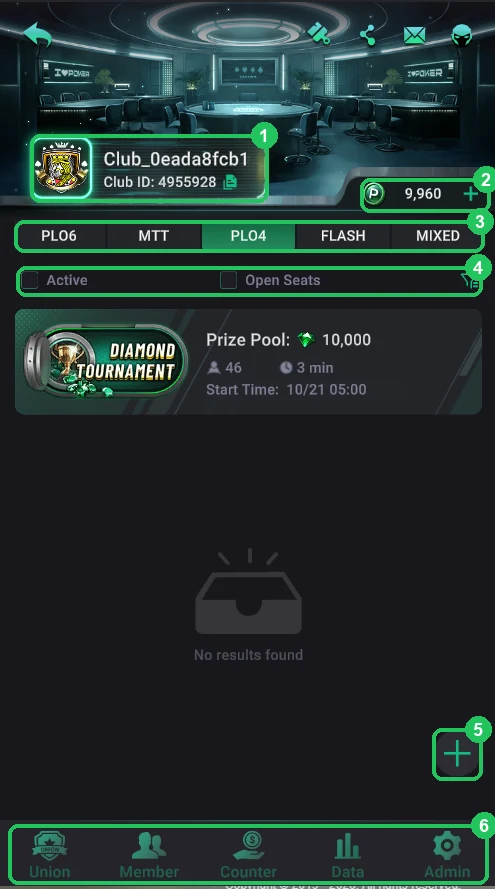
- Step 3The club lobby: tabs, filter and bottom menuWhat the club lobby is made of: name and ID, the club chip balance, game tabs, the filter, the “+” button to create a table and the bottom tabs Union, Member, Counter, Data, Admin.Open step
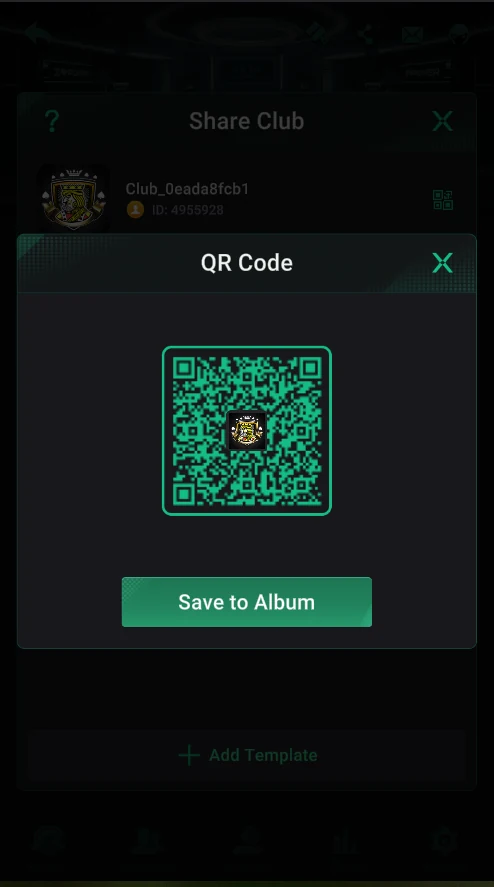
- Step 4Invite players: Share Club and the QR codeSend players the club ID or the QR code from Share Club: with the QR they download PPPoker and land straight in your club. One link can lead to up to 10 clubs.Open step
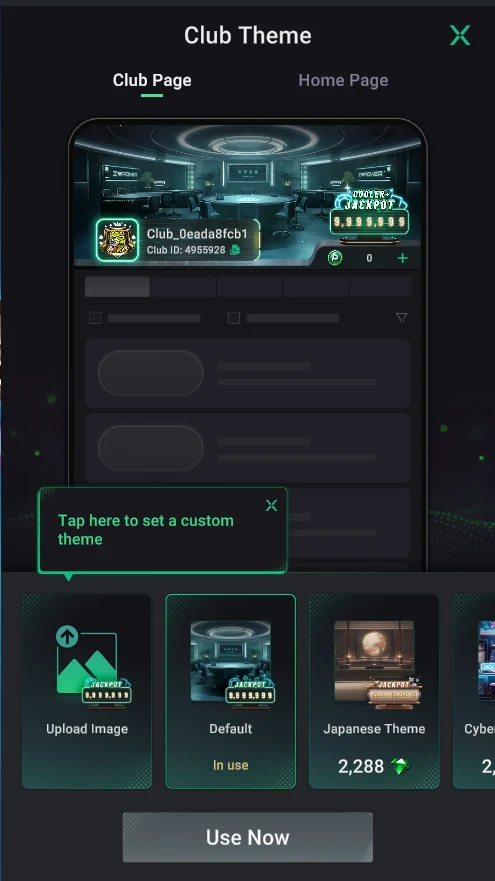
- Step 5Club Theme: lobby banner and home-screen imageThe banner in the club lobby and the club image on players’ home screens: uploading your own image is free, ready-made themes cost diamonds.Open step
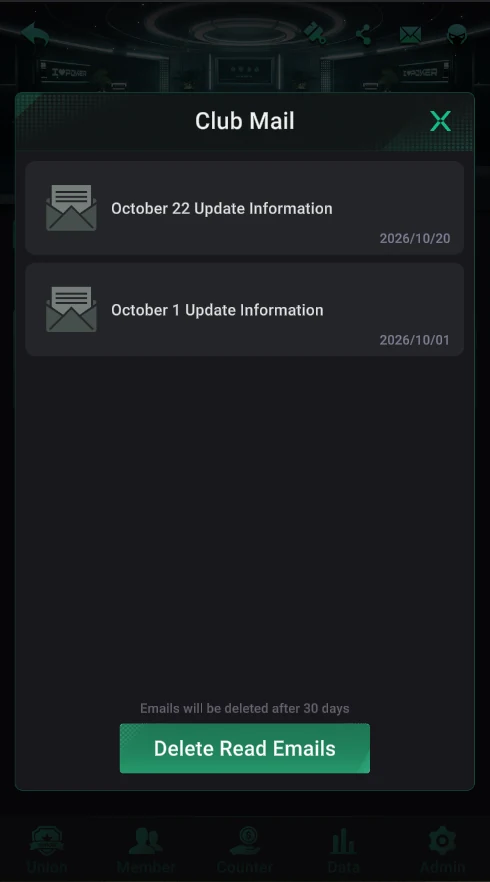
- Step 6Club MailThe envelope icon at the top of the lobby — messages from the PPPoker team to club founders and managers: updates, new features and themes. Messages are kept for 30 days.Open step
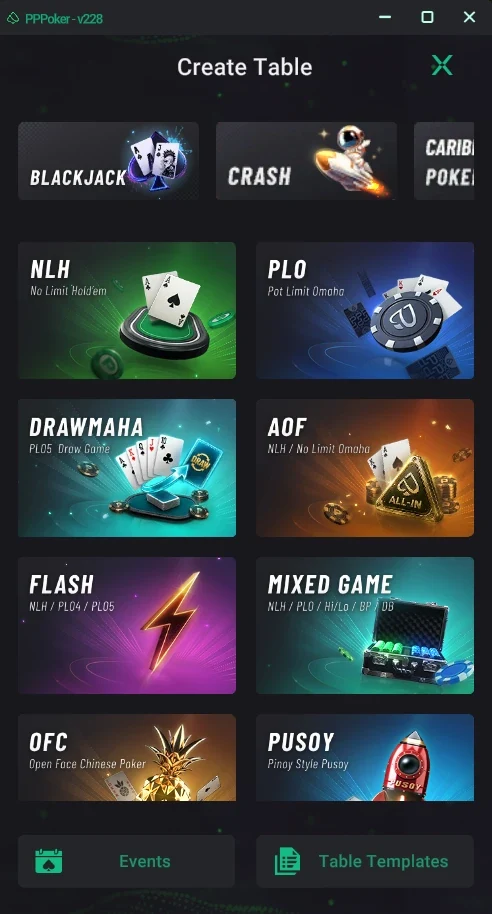
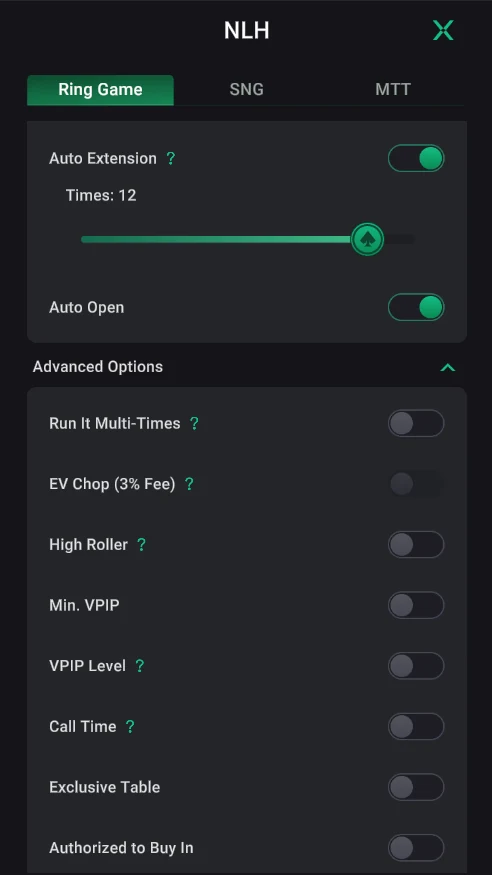
- Step 7Creating a table: the game and game modesThe “+” button in the lobby → Create Table: poker games, arcade games, Events and templates. Then the Ring Game, SNG or MTT format, seats and game modes.Open step
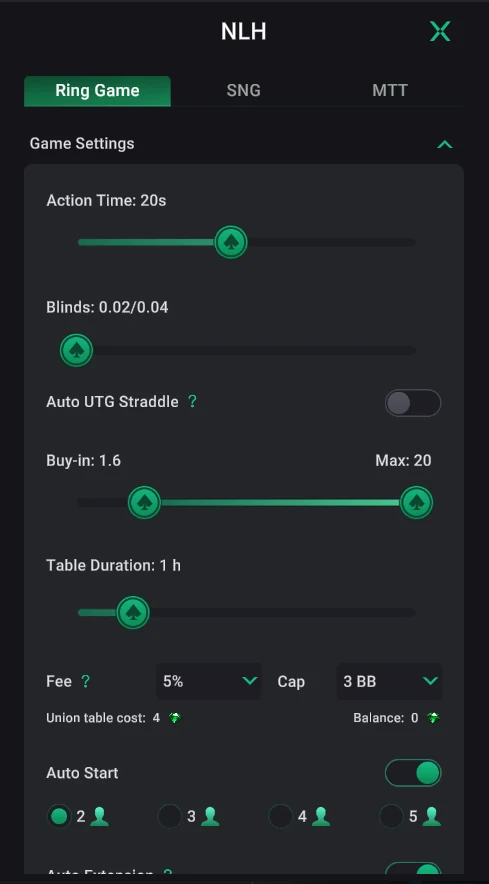
- Step 8Main table settings: blinds, buy-in, rakeGame Settings: action time, blinds, buy-in, table duration, 5% rake with a 3 BB cap, Auto Start and Auto Extension. A union table costs diamonds for every hour.Open step
- Step 9Advanced options and anti-collusion settingsAdvanced Options and Fairness: Run It Multi-Times, EV Chop, VPIP, Call Time, buy-in approval, GPS and IP restrictions, CAPTCHA. At the bottom — Save (template) and Create.Open step
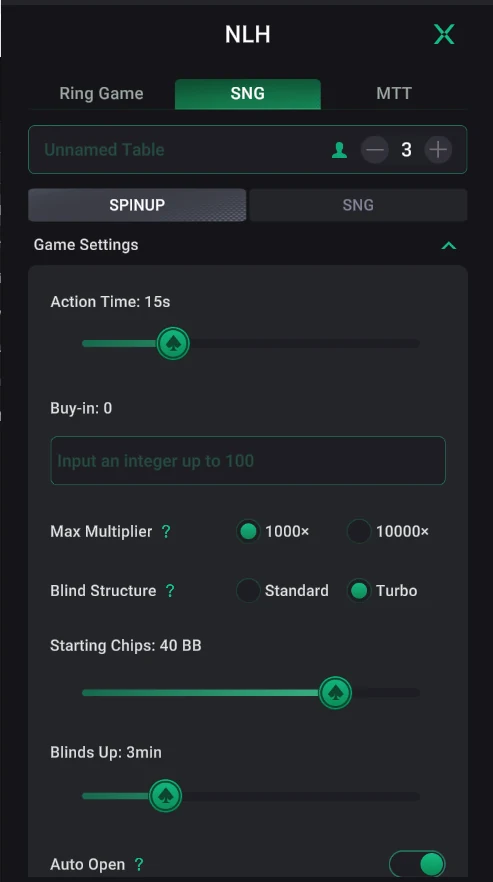
- Step 10Sit & Gos: SNG and SpinUpThe SNG tab: one-table tournaments. SpinUp is a 3-player lottery sit & go with a multiplier up to 10000×, buy-in up to 100, Standard or Turbo structure.Open step
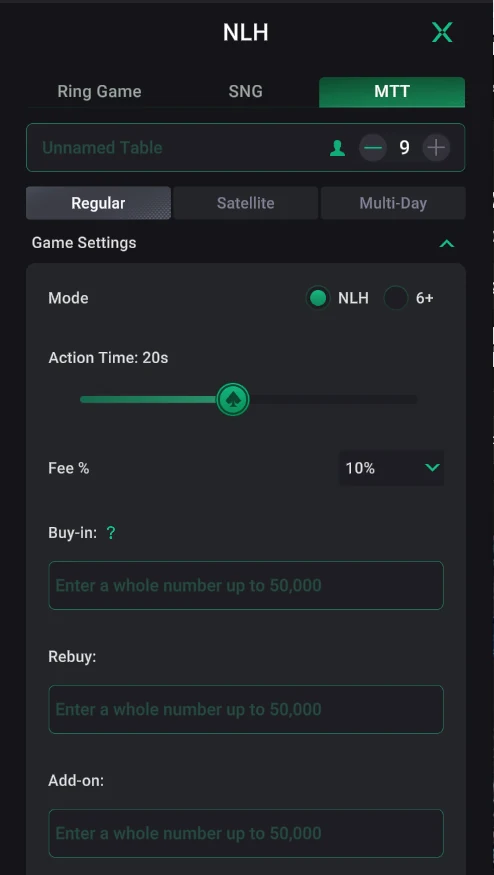
- Step 11Tournaments (MTT): buy-in, structure, late registrationThe MTT tab: Regular, Satellite or Multi-Day; a 10% fee on the buy-in, rebuys and add-ons, blind structure, starting stack, late registration, breaks and a recurring schedule.Open step
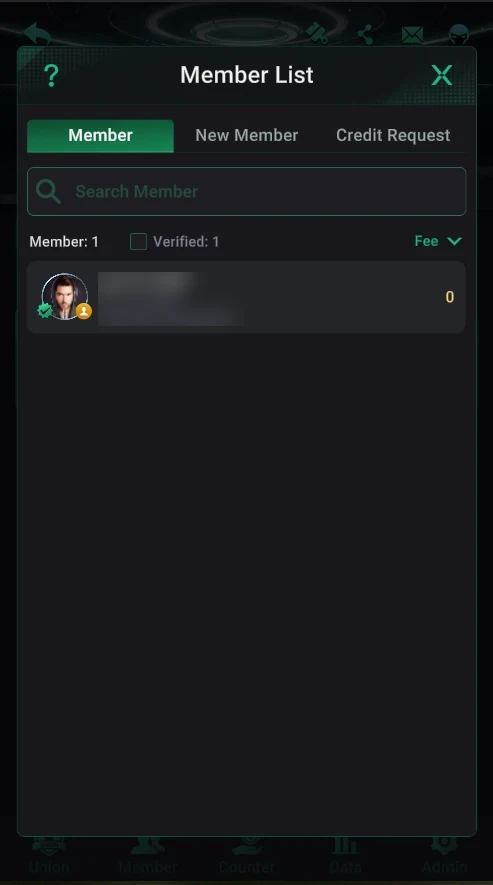
- Step 12Members, join requests and credit requestsThe Member tab: the member list with sorting, join requests (New Member), chip requests (Credit Request) and every player’s Shark Index.Open step
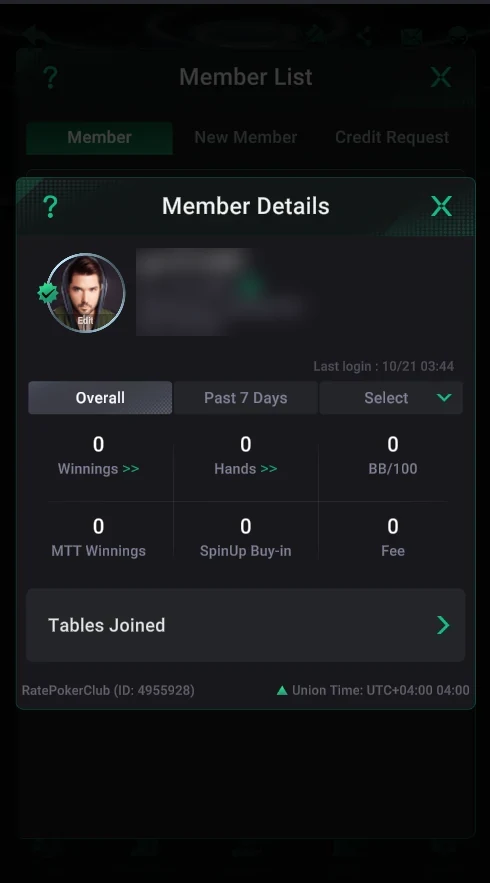
- Step 13Member details: stats, tables and notesMember Details: a player’s winnings, hands, BB/100, MTT, SpinUp and rake for a period, a breakdown by game, custom dates and time zone, active tables, a custom name and a note.Open step
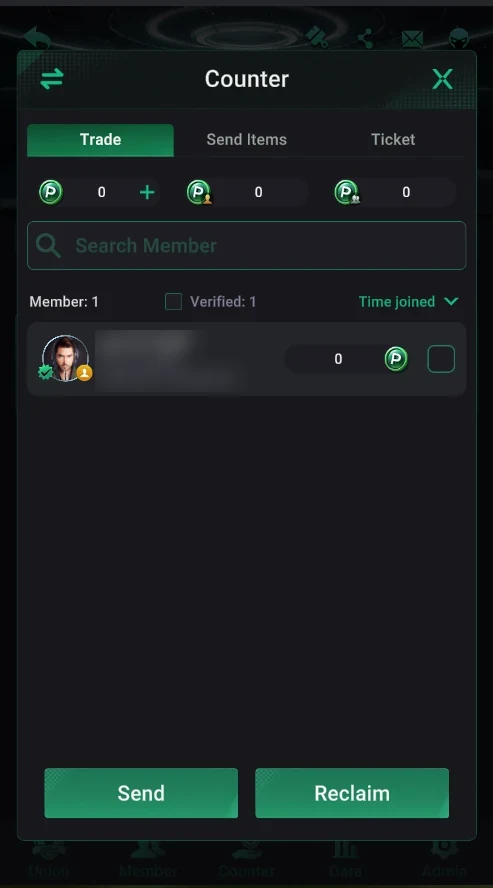
- Step 14The Counter: sending and reclaiming chips, the 5% feeCounter → Trade: the club chip balance (P), sending (Send) and reclaiming (Reclaim) chips, transaction history. Every send-out costs 5%; top-ups only with 10+ members.Open step
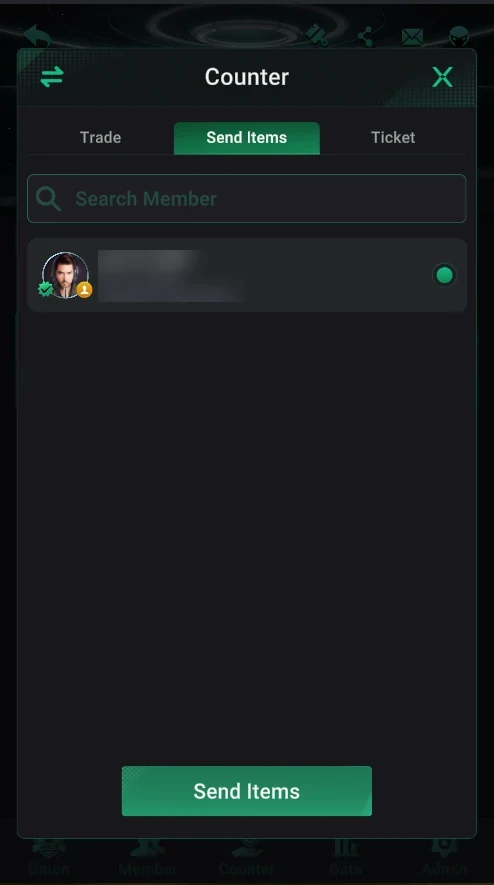
- Step 15Gifting VIP and items (Send Items)Counter → Send Items: gift a member a VIP card or items for your own diamonds — Silver from 380, Black from 1,580, Platinum 3,880, time bank, River Squeeze, Rabbit Hunting.Open step
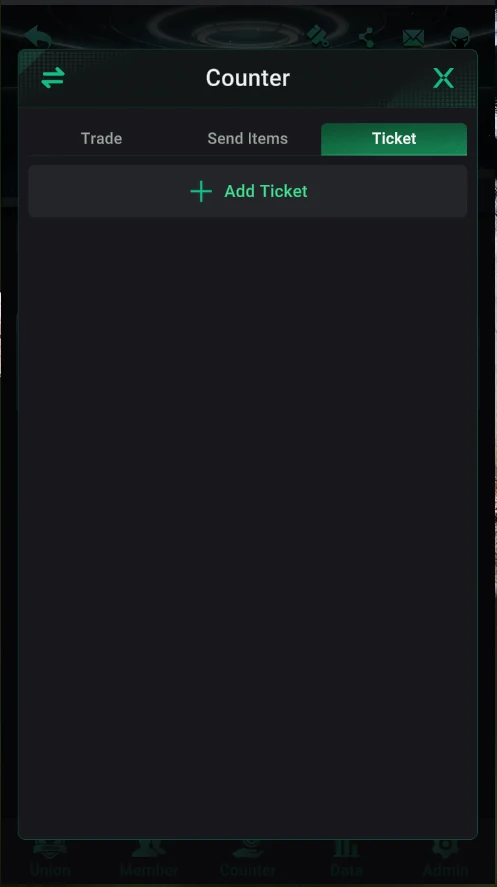
- Step 16Tournament tickets (Ticket)Counter → Ticket → Add Ticket: ticket value, expiry date and quantity. Tickets are paid from club chips with a 5% commission and work as entries into club tournaments.Open step
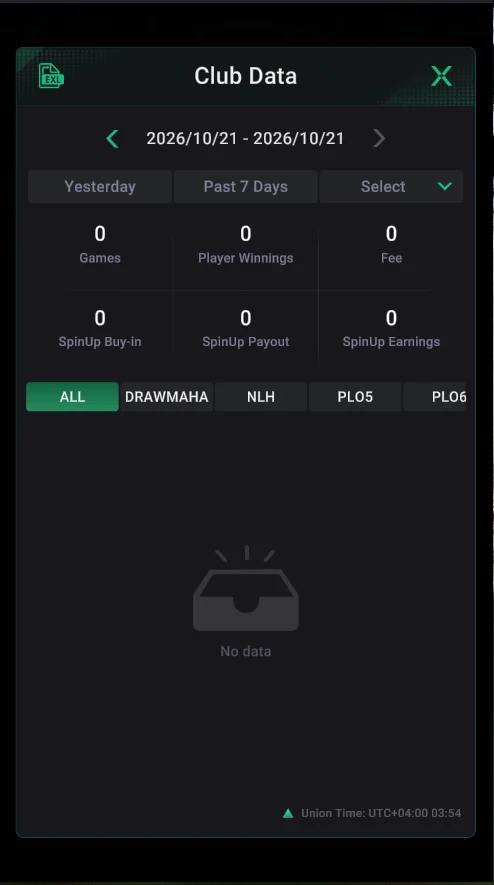
- Step 17Club Data: club stats and report exportsThe Data tab: games, player winnings, rake and SpinUp income for yesterday, 7 days or a custom period. The EXL icon exports Trade Record, Diamond Statement and Union Data by email for diamonds.Open step
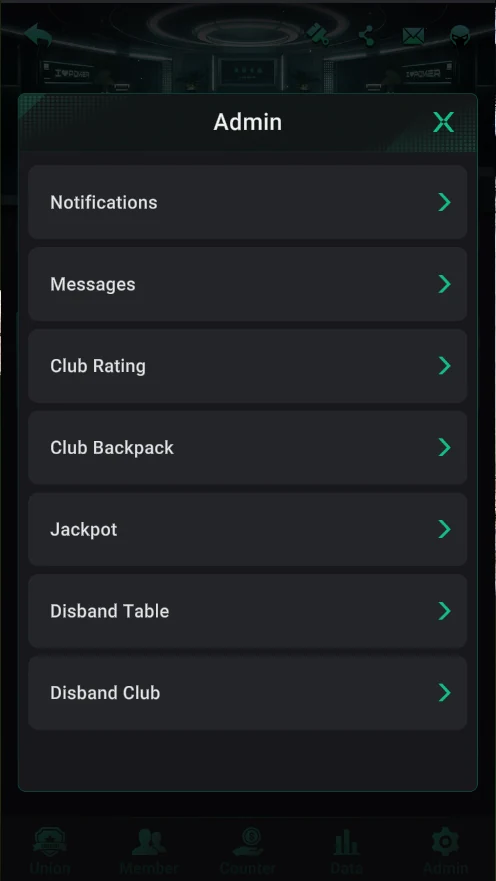
- Step 18The Admin tab and push notifications to playersAdmin: notifications, messages, rating, backpack, jackpot, disbanding tables and the club. Notifications are push messages to players’ phones — up to 10 a day, to your club or the whole union.Open step
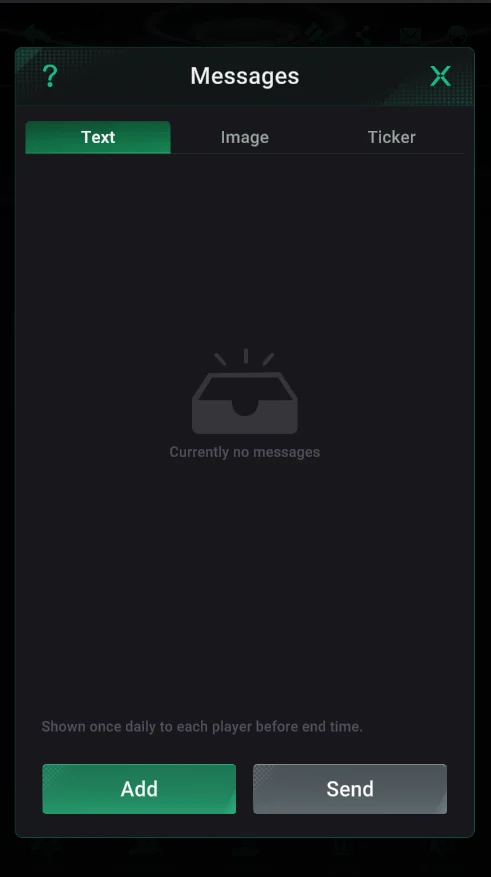
- Step 19In-club messages: text, image and tickerAdmin → Messages: a text message shown once a day, an image poster until its end time (up to 3) and a scrolling ticker up to 180 characters. All subject to PPPoker’s Community Rules.Open step
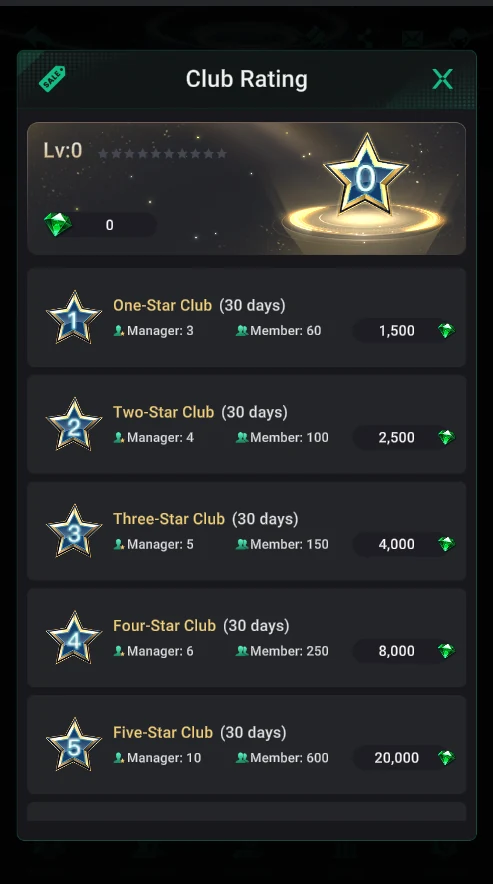
- Step 20Club level (Club Rating)Admin → Club Rating: club stars bought with diamonds for 30 days — from 1,500 diamonds for 60 members and 3 managers to 20,000 for 600. Up to 50% off for active clubs.Open step
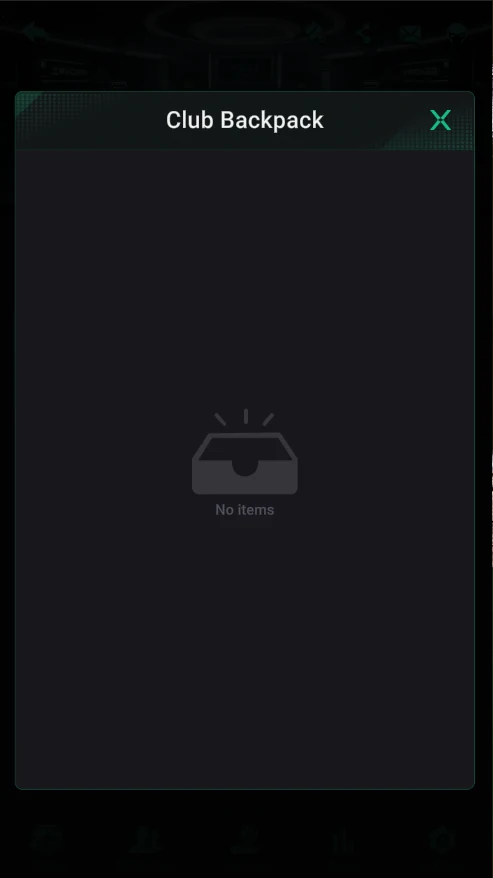
- Step 21Club BackpackAdmin → Club Backpack stores the club’s items. In a new club it’s empty, and the app has no description of it.Open step
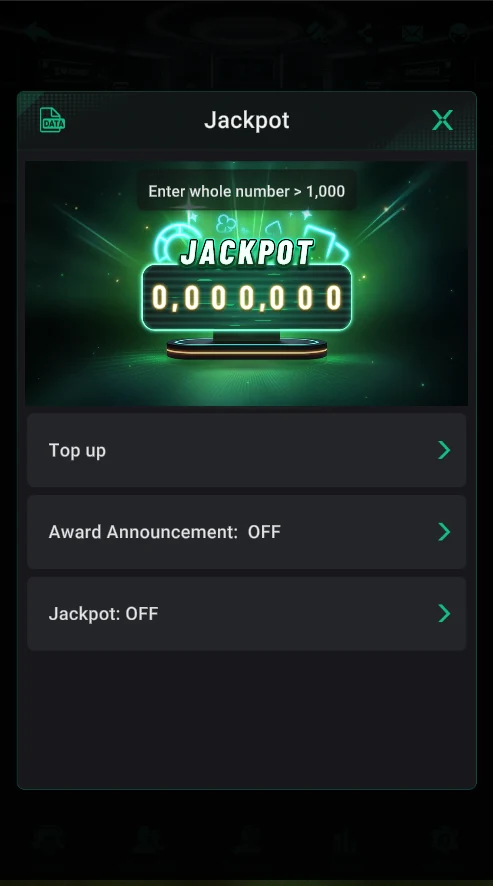
- Step 22The club jackpot (Jackpot)Admin → Jackpot: fund the jackpot with 1,000+ club chips, pick the Mixed, Cooler or Cooler Plus type and how the fee is charged, and turn on win announcements.Open step
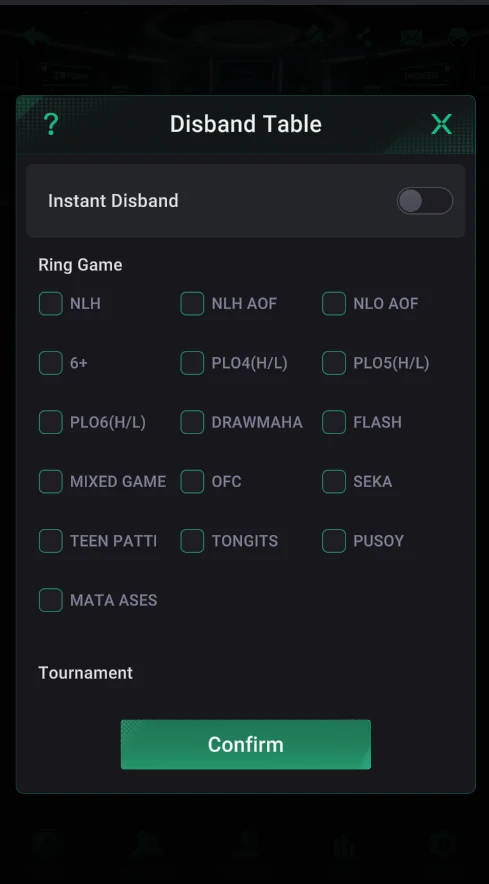
- Step 23Closing tables (Disband Table)Admin → Disband Table: close tables in bulk by game. Without Instant Disband only empty tables close; with it, all tables after the current hand; tournaments only if not started.Open step
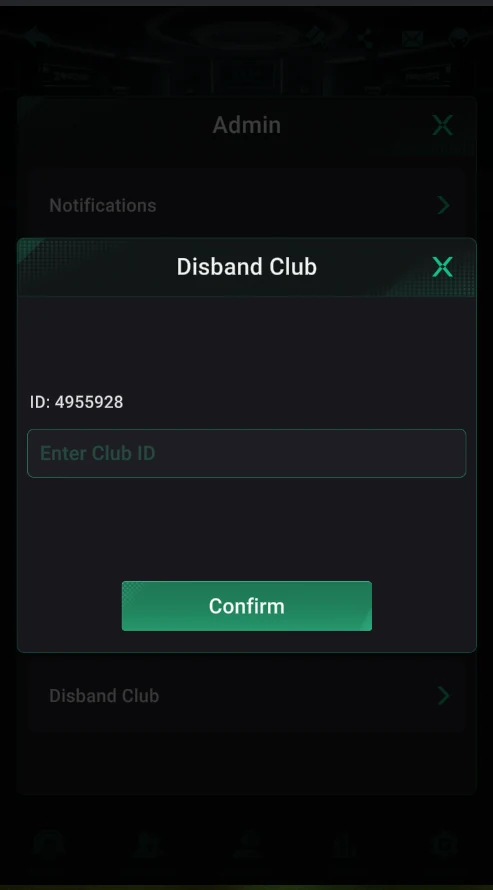
- Step 24Disbanding the club (Disband Club)Admin → Disband Club: disband the club, confirmed by entering its ID. It can’t be undone — the club, its members and club chips are deleted.Open step
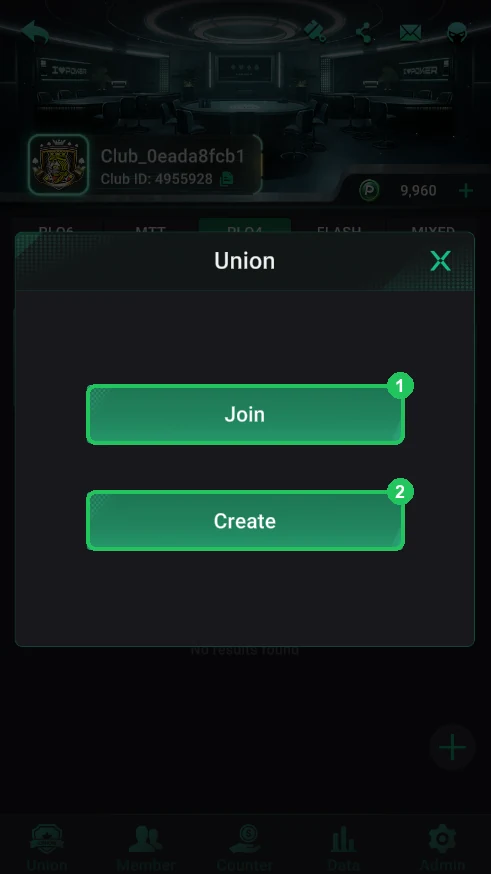
- Step 25Create a union or join oneThe Union tab in the club lobby: Join — join by union ID, Create — create your own union for free and instantly. One club, one union.Open step
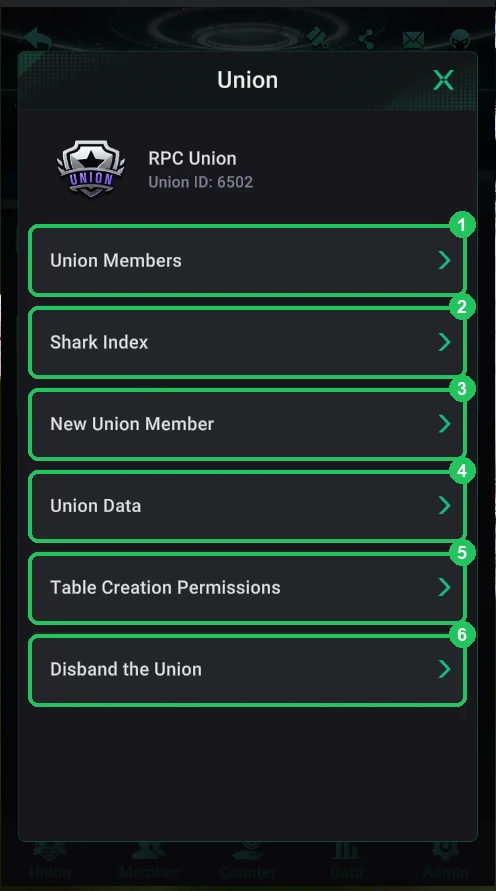
- Step 26The union menu, new clubs and Union MembersThe union menu: Union ID, members, Shark Index, club requests, Union Data, table permissions and disbanding. Union Members lists the union’s clubs and Auto Suspension.Open step
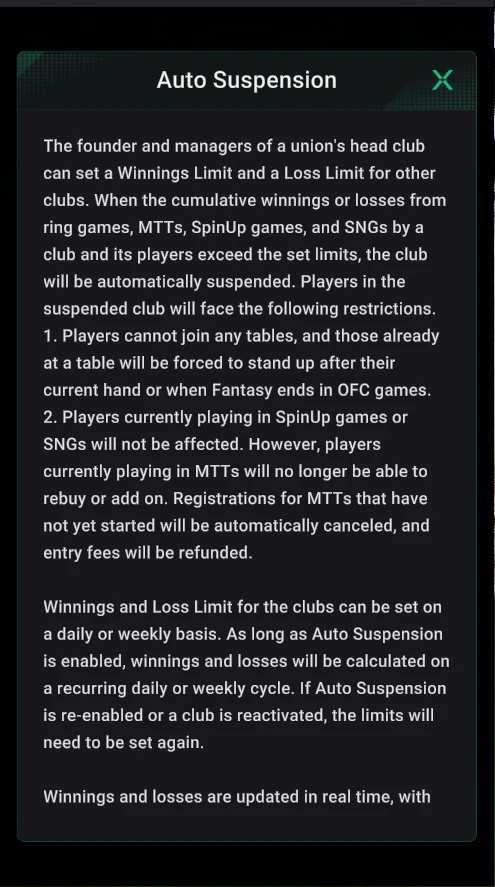
- Step 27Auto Suspension and hiding tables for a clubDaily or weekly win and loss limits for union clubs: a club past its limit is suspended automatically. Plus hiding the union’s cash tables from a club, game by game.Open step
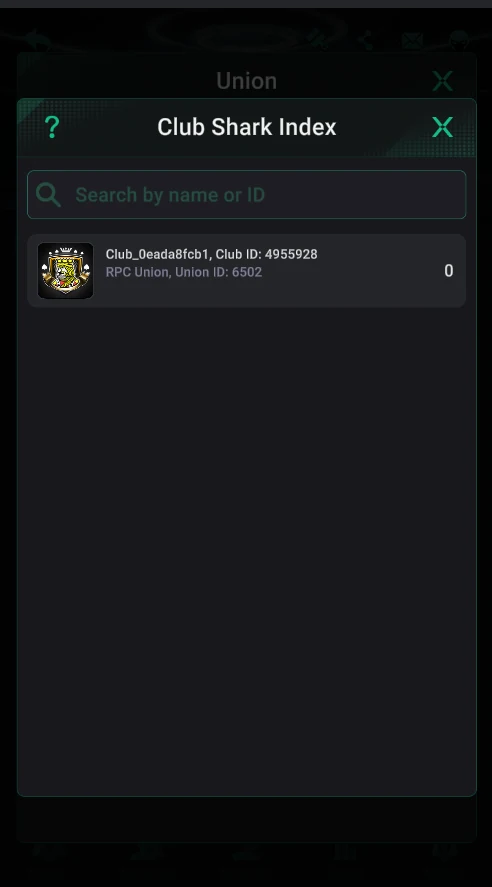
- Step 28Shark Index: which union clubs are “sharks”Club Shark Index = −(player winnings ÷ fee): red means a shark club, green means the club brings the union recreational players. It helps decide who gets limits.Open step
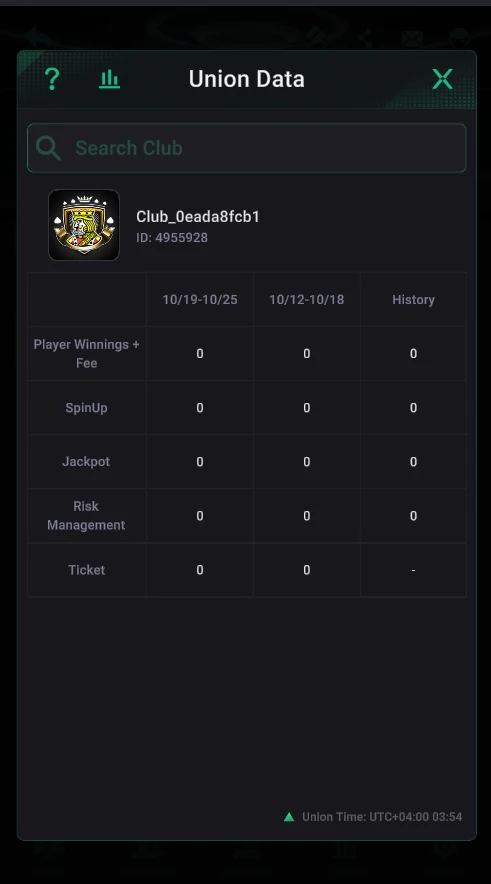
- Step 29Union Data, table permissions and disbanding the unionUnion Data — union clubs’ results by week; Table Creation Permissions — who creates shared tables; Disband the Union — confirmed by ID, and PP Chips don’t go back to clubs.Open step
Common owner mistakes
- Not building the 5% fee on every chip send-out into the club’s economics — and running the club at a loss.
- Handing out the starting chips before reaching 10 members — PP chips can’t be topped up until then.
- Creating a union in a club holding PP chips — the club’s chip balance was reset to zero.
- Leaving empty union tables open with Auto Extension — diamonds are charged for every hour.
- Turning off GPS and IP Restriction on an open table — and letting multi-accounts sit together.
- Disbanding the club (Disband Club) to “start over” — the club, its members and chips are deleted for good.
Questions and answers
How much does it cost to create a club on PPPoker?
Creating a club is free — with the house-with-plus icon on the Club card. What costs money is the club level (Club Rating: from 1,500 diamonds for 60 members for 30 days), PP club chips and union tables (diamonds per hour).
How many clubs can I create on one account?
Without VIP or with a Silver card — 1 club of your own; with VIP Black or Platinum — up to 3.
Is there a fee for issuing chips?
Yes: on every chip send-out from the club Counter the app takes 5%, paid by the club. Tournament tickets carry 5% too.
Why can’t I top up the club’s chips?
Only a club with at least 10 members can buy PP Chips. Otherwise the app says “Failed to exchange PP Chips as the club has fewer than 10 members”.
How much does it cost to create a union?
Nothing: in your club’s Union tab tap Create, enter a name and Confirm — the union is created instantly. Only union cash tables cost money — from 4 diamonds an hour at 0.02/0.04.
How do I delete a club?
Via Admin → Disband Club, confirmed by entering the club ID. It can’t be undone: the club, its members and club chips are deleted.
Club ready? Add it to the catalog
A free club page, player reviews and search traffic from people looking for PPPoker clubs.