Step 5 of 29
Club Theme: lobby banner and home-screen image
The banner in the club lobby and the club image on players’ home screens: uploading your own image is free, ready-made themes cost diamonds.
Club lobby → Club Theme
Club Theme styles the club. It has two tabs: Club Page — the banner at the top of the club lobby that every member sees, and Home Page — the club image on the Club card of players’ home screens.
At the bottom are the options: Upload Image — your own image (free), Default — the standard theme (marked “In use”), and ready-made themes for diamonds, such as Japanese Theme for 2,288 diamonds. The row scrolls right. Apply your choice with Use Now.
A theme doesn’t affect play, but it helps the club stand out among a player’s other clubs on the Club card. PPPoker announces new themes in Club Mail.
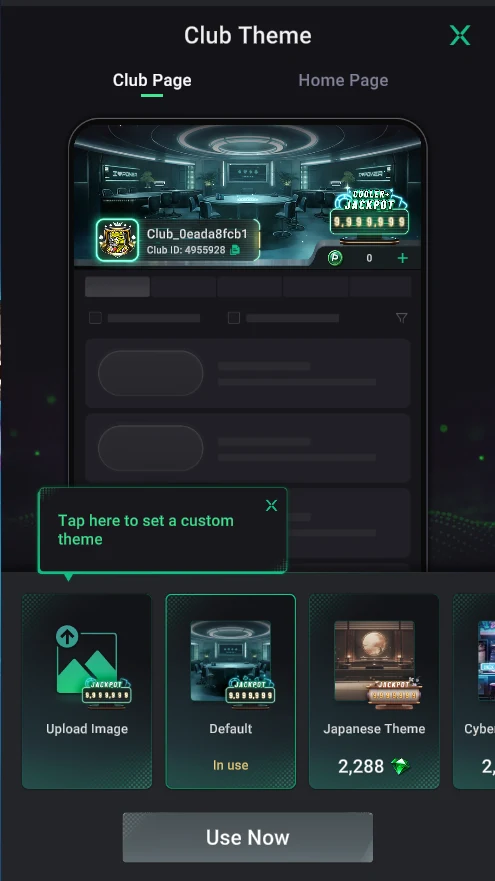
Club Page — the lobby banner
- At the top — a preview of the club lobby with the selected theme: banner, name, ID and jackpot.
- Upload Image — upload your own image (hint: “Tap here to set a custom theme”).
- Default — the standard theme; “In use” means it’s on now.
- Japanese Theme and others — ready-made themes, with the diamond price under the image.
- Use Now — apply the selected theme.
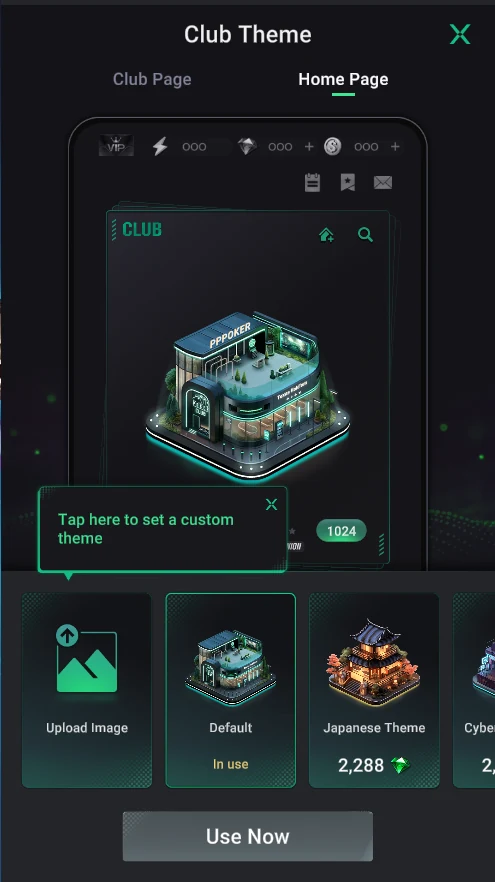
Home Page — the home-screen card
- A preview of the home screen: how the club will look on players’ Club card.
- The same options: your own image, Default or a theme for diamonds.
- Club Page and Home Page are set separately — you can change just one of them.
For your own image, pick one without small text: it’s shown small on the Club card.