Create the club: the house-with-plus icon
The house-with-plus icon on the home-screen Club card creates a club for free, and it gets an ID straight away. Own clubs: 1, or up to 3 with VIP Black or Platinum.
Open PPPoker and sign in (installing the app and signing up are covered in download PPPoker and registration). At the top of the home screen is the CLUB card with your clubs. Its header has two icons on the right: the house with a plus creates your own club and the magnifier finds another club by ID.
Tap the house with a plus and follow the app’s prompts. The new club appears on the Club card right away and gets an ID — the number players use to join. If you don’t set a name at once, the club gets an automatic one like Club_0eada8fcb1; change it in Club Profile (next step — the first rename is free).
Creating a club is free. The only limit is how many clubs you own: without VIP or with a Silver card — 1 club, with VIP Black or Platinum — up to 3.
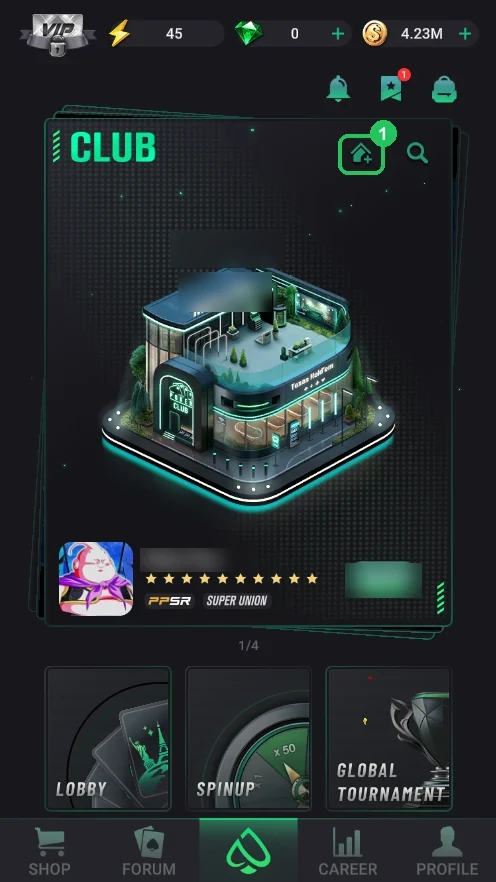
Where it is
- 1 — the house with a plus in the header of the CLUB card on the home screen — create your own club.
- The magnifier next to it searches clubs by ID — that’s how players will join yours.
- The card scrolls: it holds every club you’re in, and the new club shows up here too.
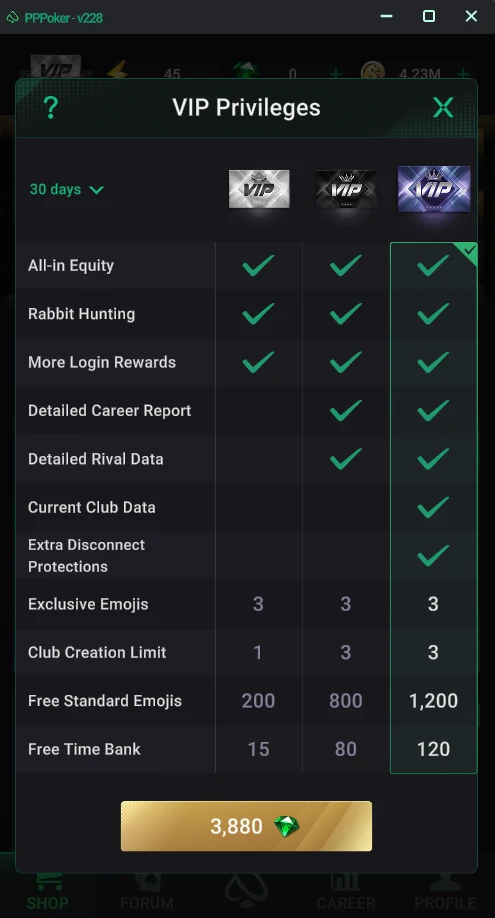
How many clubs you can create
- The Club Creation Limit row in the VIP Privileges table (Shop → VIP): Silver — 1 club, Black — 3, Platinum — 3.
- Without VIP — 1 own club. To keep a second and third, you need Black or Platinum for as long as the clubs run.
- Card prices and perks — PPPoker VIP cards.