Invite players: Share Club and the QR code
Send players the club ID or the QR code from Share Club: with the QR they download PPPoker and land straight in your club. One link can lead to up to 10 clubs.
Players join a PPPoker club in two ways. The first is by club ID: the player taps the magnifier on the home-screen Club card, enters the ID and sends a request (what the player sees — how to join a PPPoker club). The ID is shown under the club name at the top of the lobby.
The second is Share Club: the share icon at the top of the lobby opens an invite by link or QR code. Save the QR to your gallery with Save to Album and send it in a messenger: through it the player downloads PPPoker and lands straight in your club, no ID needed.
New players’ requests arrive in Member → New Member and need approving (see Members and requests).
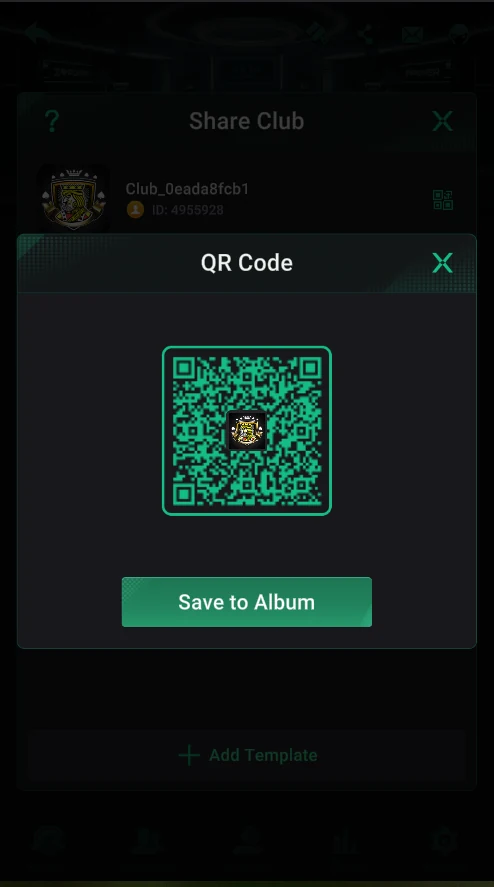
Share Club and the QR code
- At the top — your club: logo, name and ID.
- The QR icon to the right of the club opens the QR Code window.
- Save to Album — save the QR to your gallery and send it to players.
- Add Template at the bottom — one link for several clubs (right).
- The “?” at the top left — the Share Multiple Clubs hint.
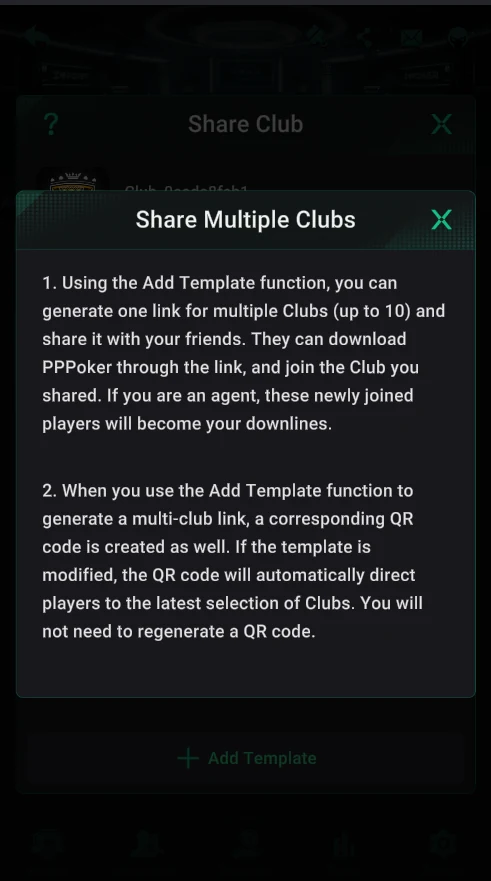
One link for several clubs
- Add Template — a template holding up to 10 clubs: a player joins all the selected clubs through one link.
- A QR code is created with the link. If you change the clubs in the template, the same QR points to the new selection — no need to regenerate it.
- If an agent invites, everyone who joins through their link automatically becomes their downline.