Creating a table: the game and game modes
The “+” button in the lobby → Create Table: poker games, arcade games, Events and templates. Then the Ring Game, SNG or MTT format, seats and game modes.
Tables are created by the owner and managers. In the club lobby tap the round “+” button at the bottom right to open Create Table with the list of games. A table has a lot of settings, so we’ve split them into pages by screen block: this one covers the game and modes, then come the main settings, advanced options, SNG and MTT.
For a first table pick NLH, Ring Game — cash hold’em players can join and leave at any time. It’s the easiest way to check blinds, buy-in and rake before opening the rest of your games.
Save a good setup with the Save button at the bottom of the settings screen — it appears in Table Templates, and your next tables take seconds to create from it.
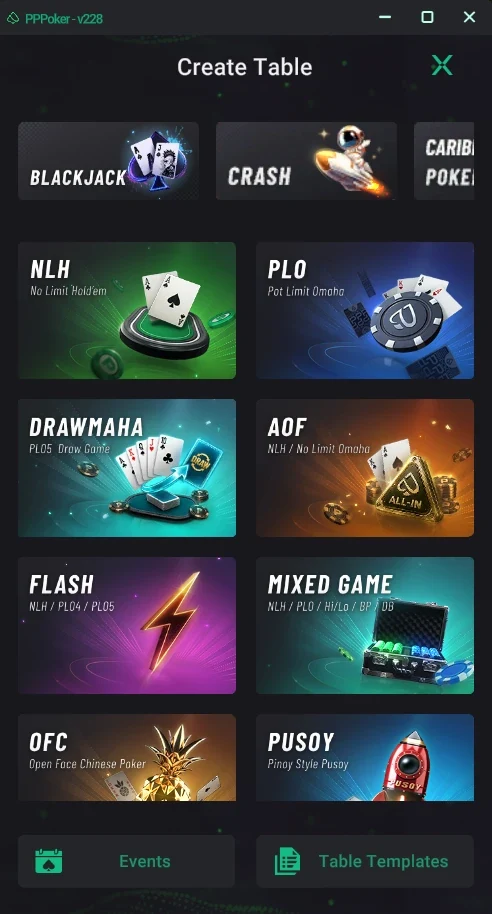
Create Table: picking the game
- At the top — arcade games: Blackjack, Crash, Caribbean Poker.
- NLH — No Limit Hold’em; PLO — Pot Limit Omaha.
- Drawmaha — PLO5 with a draw; AOF — all-in-or-fold NLH and Omaha.
- Flash — fast NLH, PLO4 and PLO5 tables; Mixed Game — NLH, PLO, Hi/Lo and more.
- OFC (Open Face Chinese), Pusoy and others — scroll down.
- Events — tournaments and events; Table Templates — saved table setups.
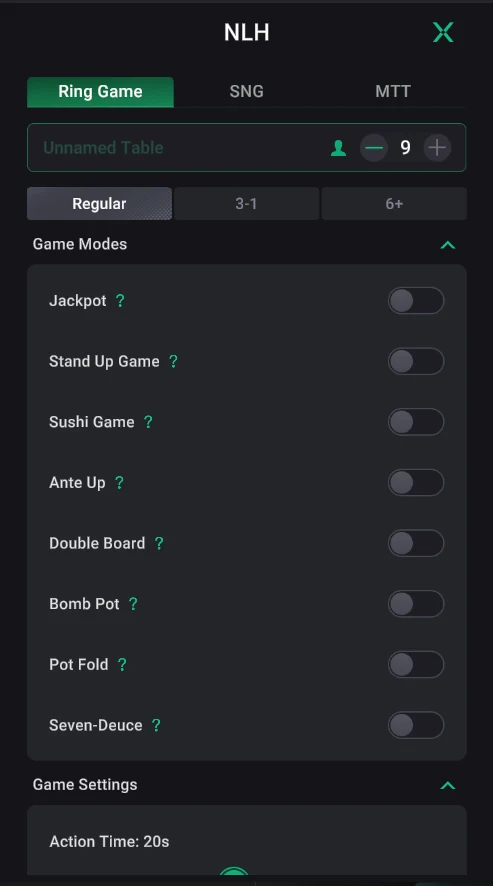
Table format and Game Modes
- Ring Game (cash), SNG and MTT tabs — the table format.
- The name field (Unnamed Table) and seats — up to 9, with “−” and “+”.
- The NLH variant: Regular, 3-1 or 6+ (Short Deck).
- Jackpot — the table is part of the club jackpot, with a jackpot fee (turning on the jackpot).
- Stand Up Game — elimination: the last player who hasn’t won a pot loses.
- Sushi Game — a special mode with extra payouts (rules in “?”).
- Ante Up — raised antes for action; Double Board — two boards, the pot is split between them.
- Bomb Pot — periodic hands where everyone antes and play starts on the flop.
- Pot Fold — a pot fold mode (rules in “?”); Seven-Deuce — a bonus from every player for winning a pot with 7-2.