Step 4 of 42
Creating a table: getting started
Create New Table → NLH → Ring Game: every table setting explained — blinds, buy-in, rake, timing, restrictions.
Club lobby → Create New Table → NLH → Ring Game
In the club lobby tap Create New Table. You pick the game first, then the settings screen opens. The numbers below match the numbers on the screenshots: go through them top to bottom and tap Create.
For your first table use NLH, Ring Game, 6 seats — a cash hold’em table players can join and leave any time. It’s the easiest way to check blinds and rake before opening the rest of your line-up.
Some settings can’t be changed on a running table — you’d have to close it and create a new one. Save a good set-up with Save Template (32) and create future tables from the template in seconds.
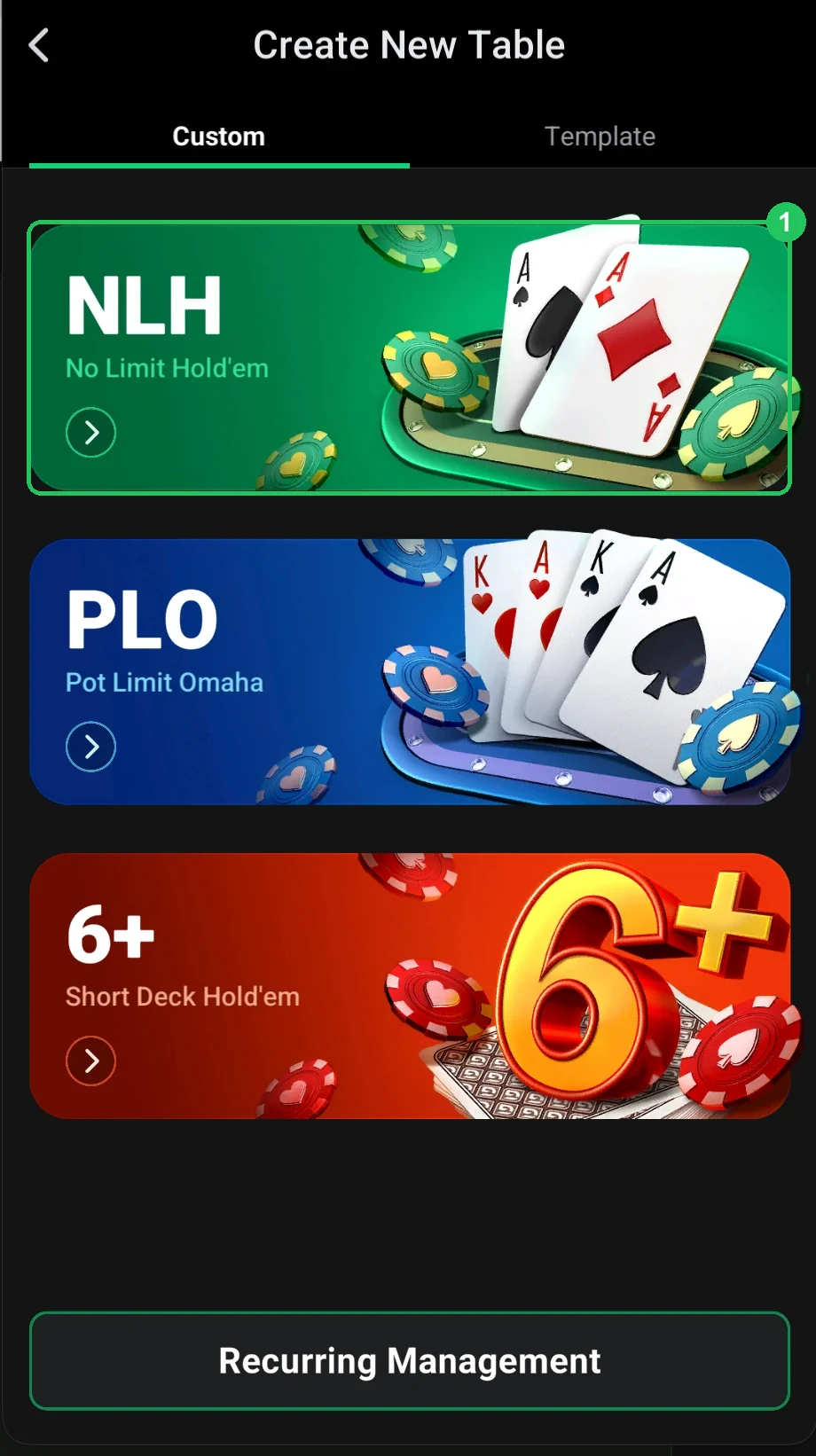
Choosing the game (screenshot 1)
- 1 — NLH (No Limit Hold’em). PLO (Omaha) and 6+ (Short Deck) are next to it.
- The Template tab and Recurring Management on this screen stay inactive until you’ve saved a template or created a recurring table — they aren’t available the first time.
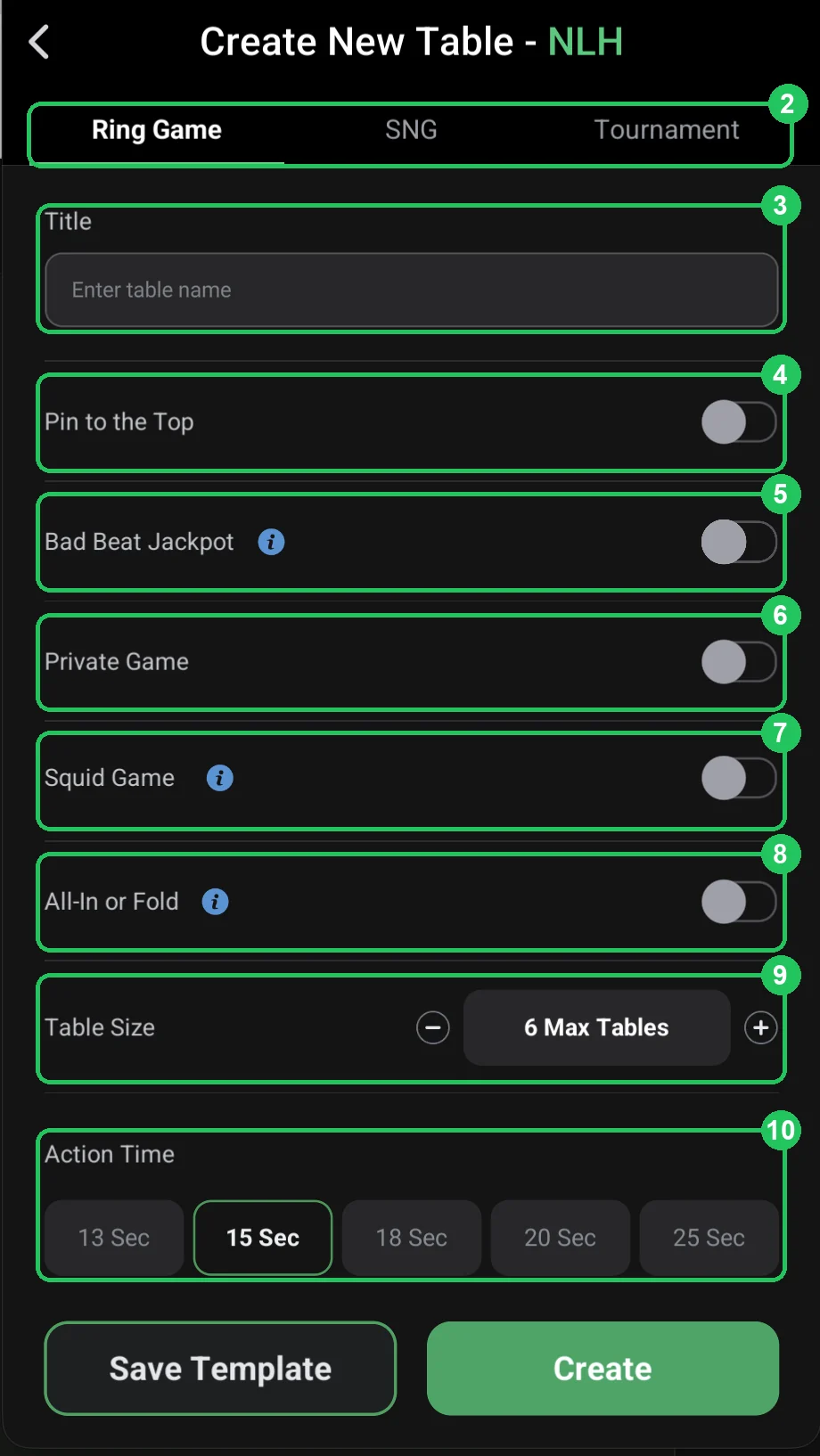
Basics (screenshot 2)
- 2 — Ring Game / SNG / Tournament: cash table, Sit & Go (starts when it fills) or a scheduled tournament.
- 3 — Title: the table name in the lobby (e.g. “NLH 0.01/0.02”).
- 4 — Pin to the Top: pin the table to the top of the club lobby.
- 5 — Bad Beat Jackpot: the table takes part in the bad beat jackpot (pots contribute to it).
- 6 — Private Game: a restricted-access table, not open to every member.
- 7 — Squid Game: a special mode — everyone must win at least one pot; the last player without a win pays the others.
- 8 — All-In or Fold: an AoF table — all-in or fold only.
- 9 — Table Size: number of seats, from heads-up to 9-max. 6-max is the most popular.
- 10 — Action Time: time per decision — 13–25 seconds. 15 sec is a good start.
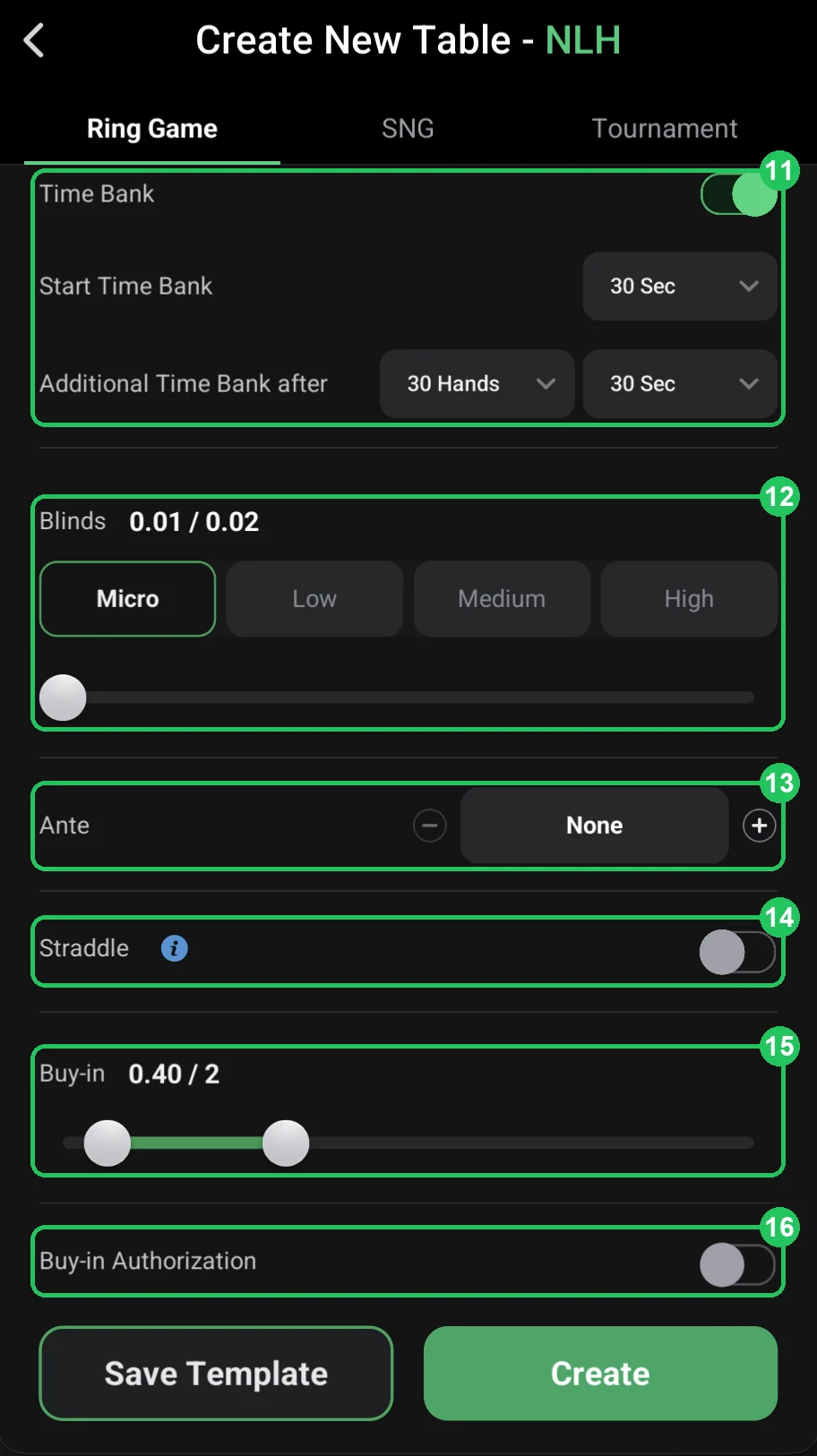
Time, blinds and buy-in (screenshot 3)
- 11 — Time Bank: extra time for tough decisions — a starting bank plus top-ups every N hands.
- 12 — Blinds: the table stakes. Micro / Low / Medium / High presets and a slider — e.g. 0.01/0.02.
- 13 — Ante: an ante from every player, off by default.
- 14 — Straddle: allow a straddle — a voluntary blind raise before the deal.
- 15 — Buy-in: minimum and maximum buy-in. 0.40 / 2 at 0.01/0.02 blinds is 20–100 big blinds.
- 16 — Buy-in Authorization: every buy-in must be approved by a club admin.
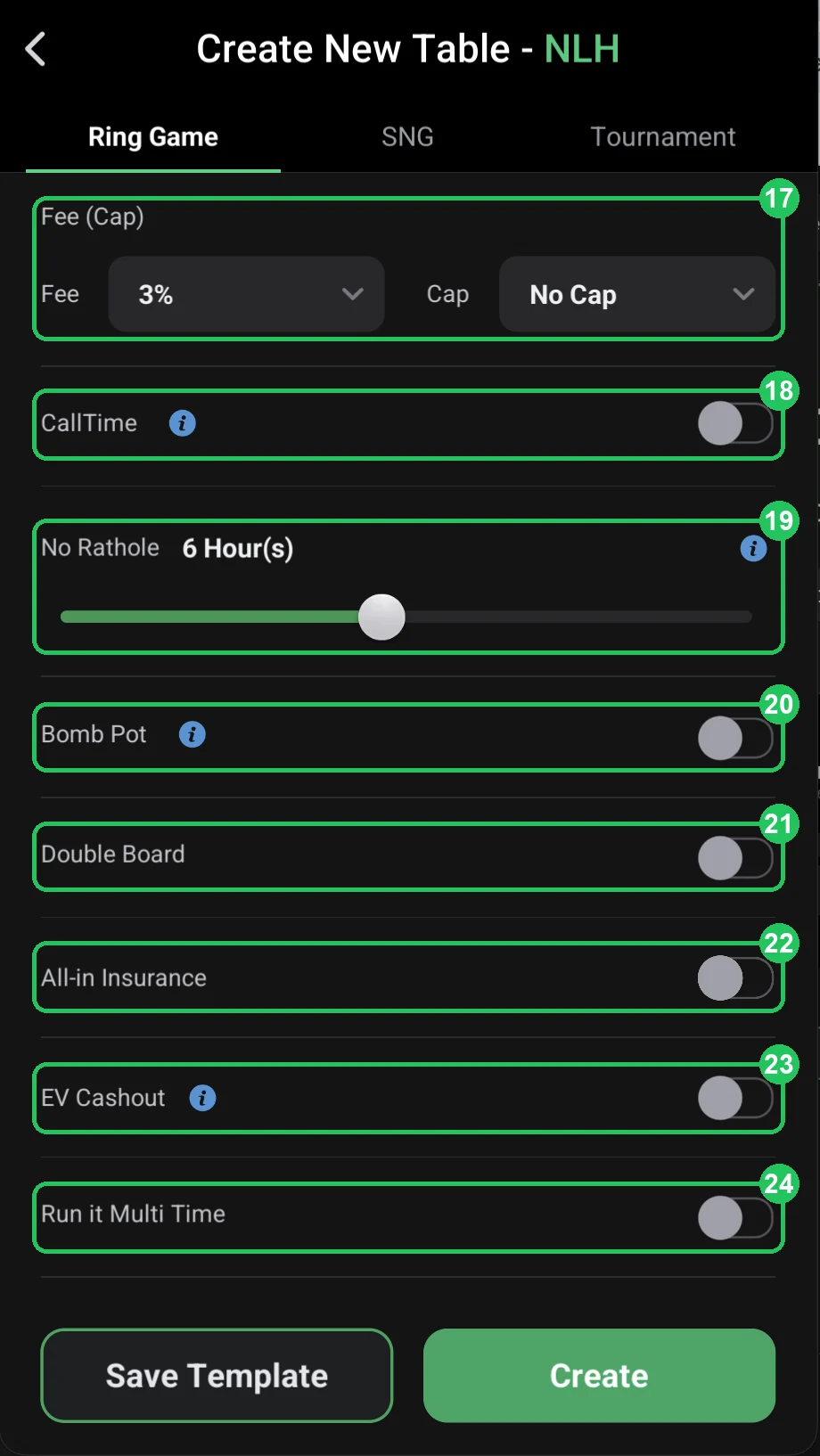
Rake and game features (screenshot 4)
- 17 — Fee (Cap): rake — a percentage of the pot (Fee) and the maximum per hand (Cap). 3% with no cap is expensive for players; above-market rake is the top reason for bad reviews.
- 18 — CallTime: a rule against hit-and-run play — see the “i” tooltip in the app.
- 19 — No Rathole: a player who leaves can’t come back with a smaller stack for the set time (e.g. 6 hours).
- 20 — Bomb Pot: periodic bomb pots — everyone antes and the hand starts on the flop.
- 21 — Double Board: two boards, the pot is split between them.
- 22 — All-in Insurance: insurance in all-in spots.
- 23 — EV Cashout: take your equity in an all-in without waiting for the run-out.
- 24 — Run it Multi Time: run the board several times in an all-in.
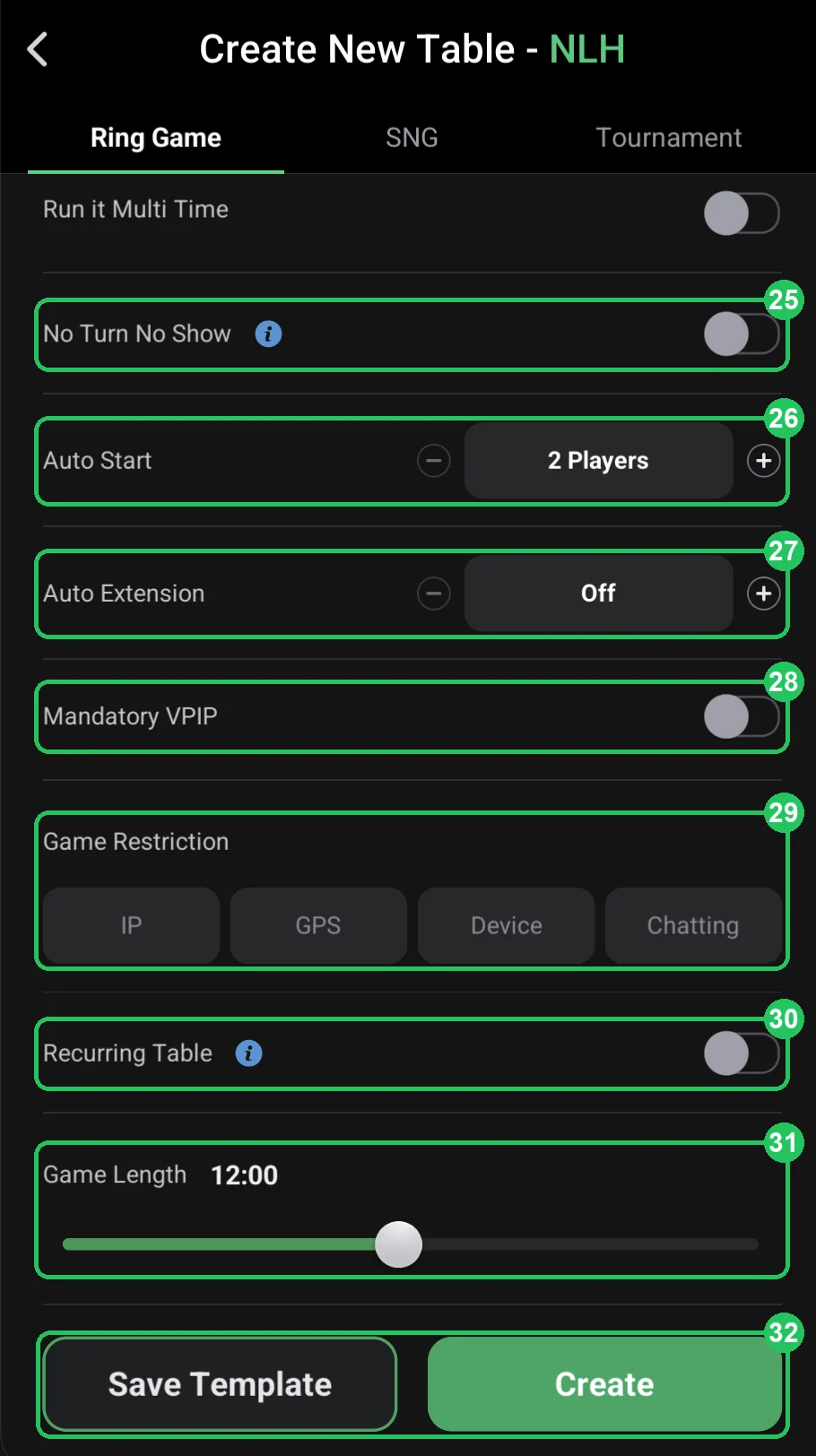
Start, restrictions and length (screenshot 5)
- 25 — No Turn No Show: a card-showing rule for hands that end before the turn (see “i” in the app).
- 26 — Auto Start: how many players start the table automatically — e.g. 2.
- 27 — Auto Extension: automatically extend the table when its time runs out.
- 28 — Mandatory VPIP: a minimum share of hands played — against nits who just sit.
- 29 — Game Restriction: anti-collusion — IP, GPS, Device (one device) and Chatting (chat off).
- 30 — Recurring Table: the table is recreated automatically after it ends.
- 31 — Game Length: how long the table runs — e.g. 12:00 hours.
- 32 — Save Template / Create: save the settings as a template or create the table.
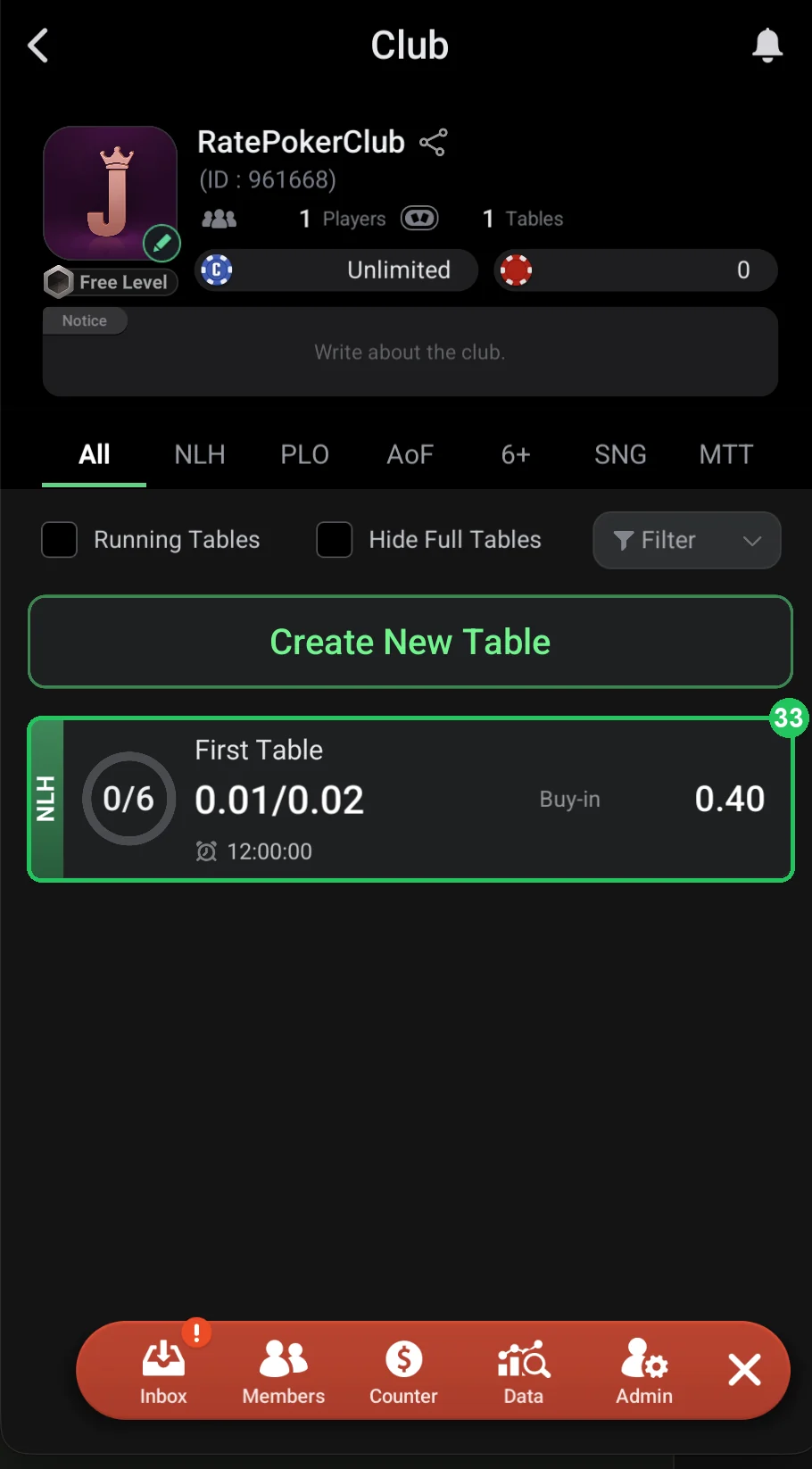
Done (screenshot 6)
- 33 — the table appears in the club lobby: NLH, 0/6 players, 0.01/0.02 blinds, 0.40 buy-in and the time left.
Don’t open lots of tables at once: five empty tables put people off more than one table with a game running.
Compare your rake with ClubGG clubs in our catalog — players go where the rake is lower.