Start rules, restrictions and launch
No Turn No Show, Auto Start, Auto Extension, Mandatory VPIP, IP/GPS/Device restrictions, recurring tables, game length and the Create button.
The last block of settings covers when the table starts, how long it runs and who’s kept out. It also holds the Save Template and Create buttons — after them the table appears in the club lobby.
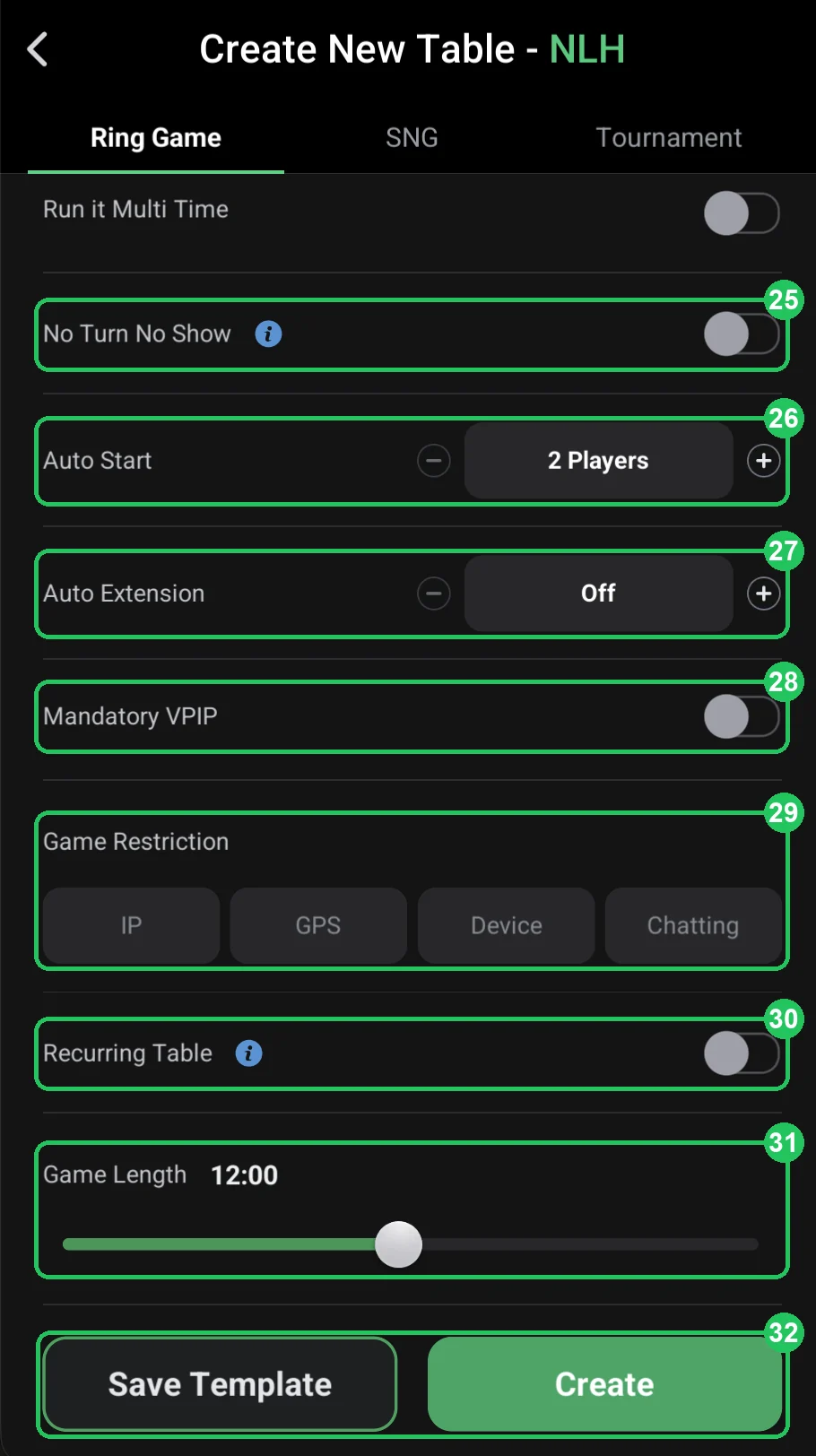
Auto Start (26) sets how many players it takes for the table to start dealing on its own. For a cash table set 2: play begins as soon as two players sit down, and the rest join in. Game Length (31) is how long the table runs, e.g. 12 hours. When time is up the table closes; to stop that happening mid-game there’s Auto Extension (27), and for tables that should always be open there’s Recurring Table (30): the table is recreated automatically after it ends. You’ll later find recurring tables under Recurring Management on the table creation screen.
Game Restriction (29) is your main protection against collusion and multi-accounting. IP and GPS stop players on the same network or in the same place from sitting at one table, Device blocks the same device, and Chatting turns off table chat. For a club playing on deposits, turn IP and GPS on from day one; for a home game where friends sit in the same room, IP and GPS would just get in the way, so leave them off (more on collusion in bots and collusion in poker apps).
Mandatory VPIP (28) requires players to play a minimum share of hands — it targets nits who sit and wait for premium hands only. No Turn No Show (25) is a card-showing rule for hands that end before the turn; check the “i” tooltip in the app for exactly how it works. Neither is required on a first table.
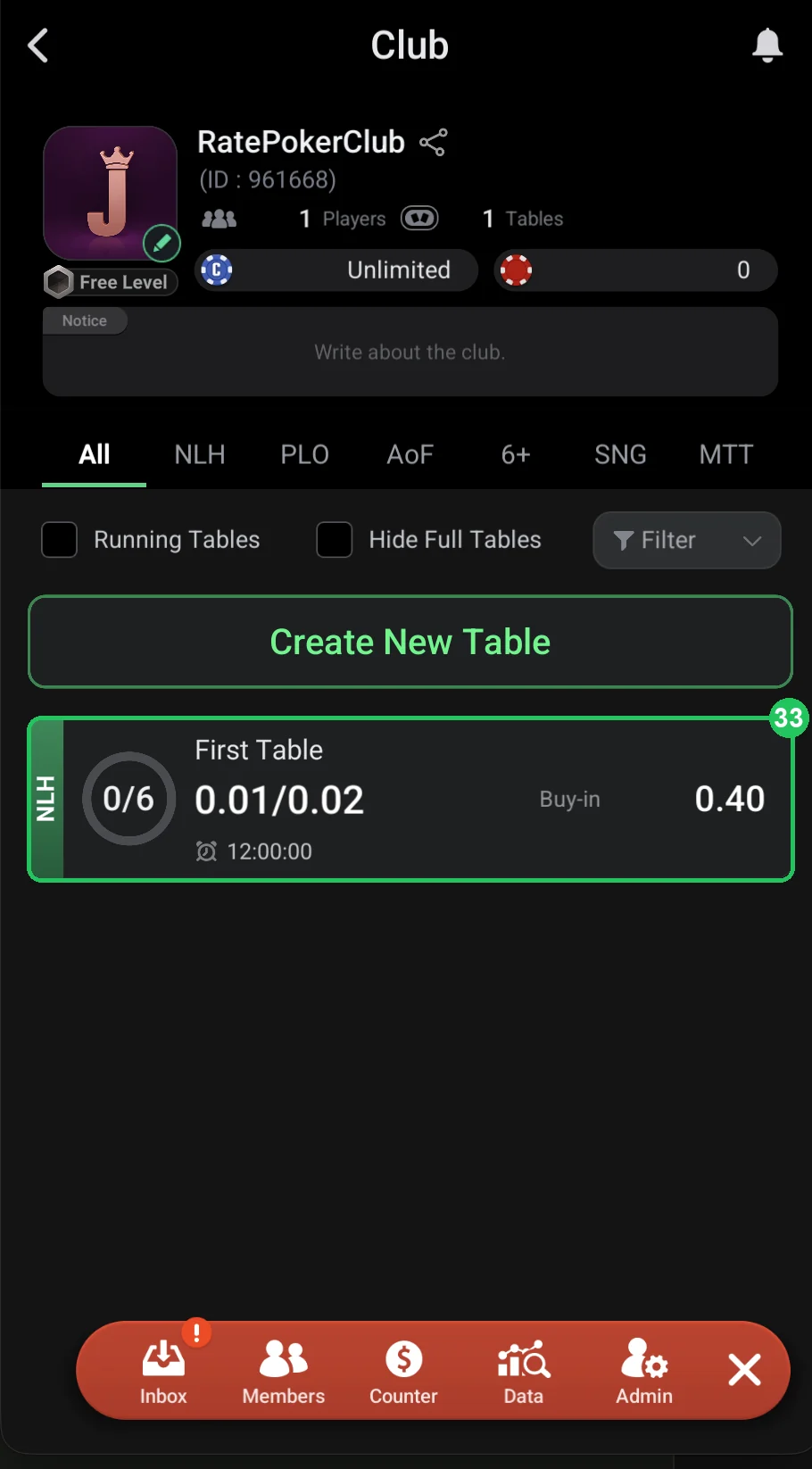
When everything is set, tap Save Template (32) to save the set-up as a template, then Create. The table appears in the club lobby (33), showing the game, the number of players, the blinds, the buy-in and the time left. Some settings can’t be changed on a running table — you have to close it and create a new one — and that’s where a template saves a lot of time.
Start, restrictions and length (screenshot 1)
- 25 — No Turn No Show: a card-showing rule for hands that end before the turn (see “i” in the app). Recommendation: leave the default.
- 26 — Auto Start: how many players start the table automatically — e.g. 2. Recommendation: 2.
- 27 — Auto Extension: automatically extend the table when its time runs out. Recommendation: on, so the table doesn’t close mid-game.
- 28 — Mandatory VPIP: a minimum share of hands played — against nits who just sit. Recommendation: off on a first table.
- 29 — Game Restriction: anti-collusion — IP, GPS, Device (one device) and Chatting (chat off). Recommendation: IP and GPS on for a club with deposits; off for a home game.
- 30 — Recurring Table: the table is recreated automatically after it ends. Recommendation: on for your main table.
- 31 — Game Length: how long the table runs — e.g. 12:00 hours. Recommendation: 12–24 hours.
- 32 — Save Template / Create: save the settings as a template or create the table. Recommendation: Save Template first, then Create.
Done (screenshot 2)
- 33 — the table appears in the club lobby: NLH, 0/6 players, 0.01/0.02 blinds, 0.40 buy-in and the time left.
- Check the table card: if the stakes or buy-in are wrong, close the table and recreate it from the template while nobody is sitting there.
Checklist before you tap Create
- The title includes the game and stakes.
- Buy-in is 40–100 or 50–100 big blinds.
- Rake has a cap and isn’t higher than at neighbouring clubs.
- IP/GPS restrictions are on (unless it’s a home game).
- Game length and auto extension are set, the template is saved.